Review · Plans and prices checked in 6 markets, 18–19 October 2026
FreshBooks Review 2026: Plans, Client Limits, Prices & Add-ons
Disclosure: The FreshBooks buttons in this review are affiliate links (marked “partner link”). If you click through and buy, we may earn a commission at no extra cost to you. The limits and extra costs below are the same either way. Learn more.
Our take
FreshBooks is built for people who bill clients: freelancers, consultants, agencies and trades that quote, invoice, track time and chase payment. Time tracking and expenses are unlimited on every plan, and proposals, retainers and project profitability are there when you need them. What limits it is the number of clients you can bill (5 on Lite, 50 on Plus), and each team member costs extra on every plan. Businesses that need inventory or full payroll outside the US will outgrow it.
How this review works: every price, limit and feature comes from FreshBooks’ official pricing pages and FAQ for each market, read on 18–19 October 2026. We haven’t run a hands-on test, so there’s no star rating here. See how FreshBooks compares with other accounting software for small business.
FreshBooks at a glance
| Best for | Freelancers and service businesses that invoice clients and track time |
|---|---|
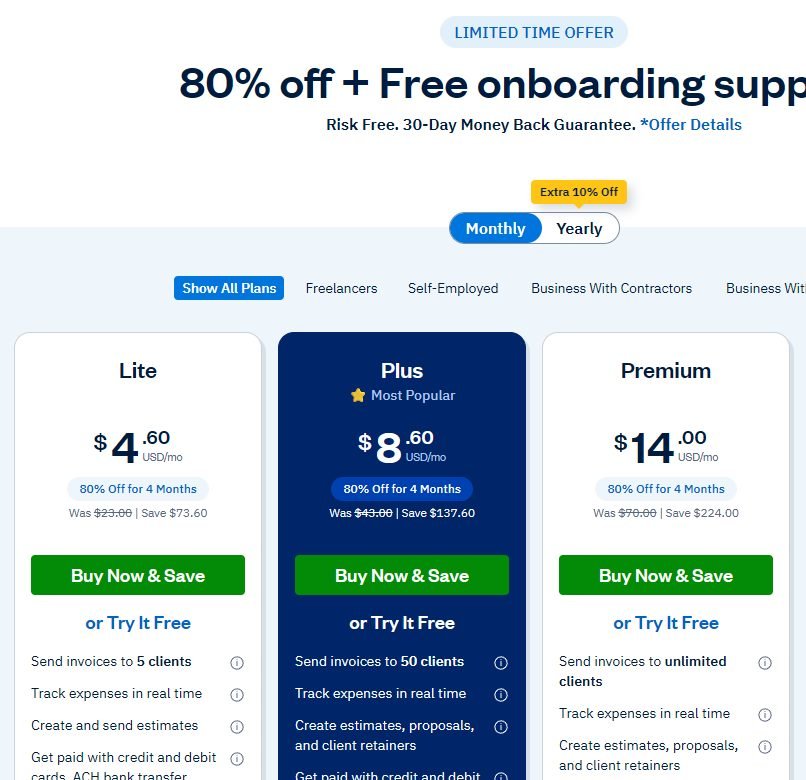
| Price (US) | Lite $23 · Plus $43 · Premium $70 a month · Select custom |
| Billable clients | 5 (Lite) · 50 (Plus) · unlimited (Premium, Select) |
| Users | 1 owner on each plan. Team members are $11/month each in the US; Select includes 2 |
| Free plan | No. 30-day free trial with no credit card, plus a 30-day money-back guarantee on purchases |
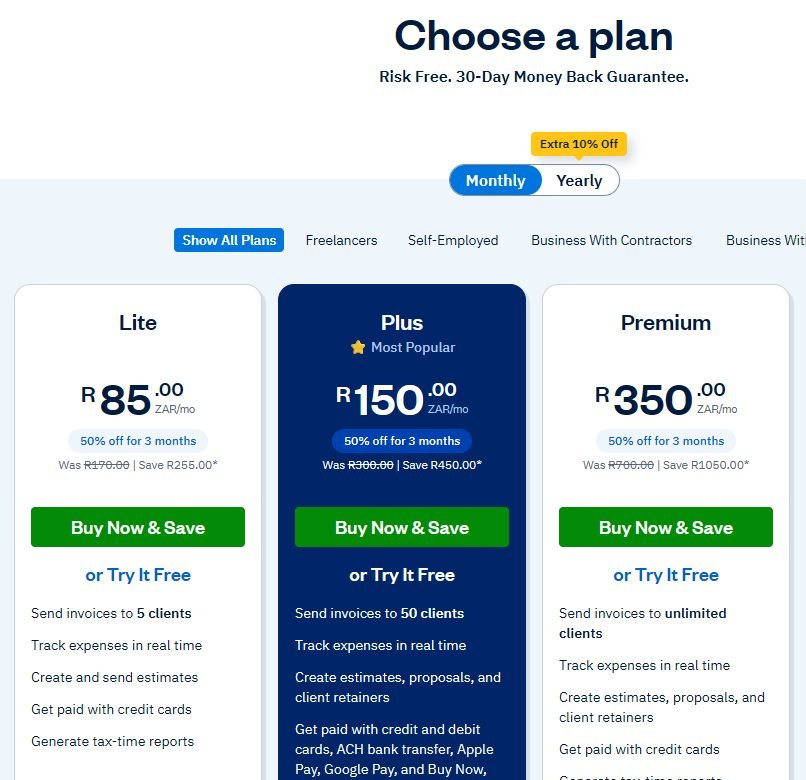
| Offer when checked | US and Canada: 80% off for 4 months. UK, AU, ZA, EUR: 50% off for 3 months. Yearly billing takes an extra 10% off |
| Pricing markets | US, Canada, UK, Australia, South Africa, and euro pricing |
FreshBooks pricing in 6 markets
FreshBooks uses the same four plans everywhere and only changes the currency and price. Regular monthly prices:
| Market | Lite | Plus | Premium | Team member | Offer when checked |
|---|---|---|---|---|---|
| United States | $23 | $43 | $70 | $11/mo | 80% off for 4 months |
| Canada | C$26 | C$42 | C$72 | C$13/mo | 80% off for 4 months |
| United Kingdom | £16 | £30 | £42 | £8/mo | 50% off for 3 months |
| Australia | A$29 | A$43 | A$60 | A$16/mo | 50% off for 3 months |
| South Africa | R170 | R300 | R700 | Extra | 50% off for 3 months |
| Euro pricing | €16 | €30 | €50 | Extra | 50% off for 3 months |
Select is priced by quote in every market. Yearly billing adds an extra 10% off. See how FreshBooks stacks up for your country in our comparison table.
Plans, tier by tier
- Lite ($23): invoices for up to 5 clients, unlimited estimates, recurring invoices, late-payment reminders, unlimited time tracking and expenses, automated bank import, mileage tracking and tax-time reports. Clients can pay by card, ACH, Apple Pay, Google Pay or buy now, pay later. Lite doesn’t include bank reconciliation, double-entry accounting reports or accountant access.
- Plus ($43): 50 clients, and adds the parts that make it real accounting: double-entry reports, bank reconciliation, accountant access, and automatic receipt data capture. It also adds proposals, e-signatures and client retainers.
- Premium ($70): unlimited clients, plus project profitability, accounts payable, bill capture and customised email templates.
- Select (custom): lower card transaction fees and capped ACH fees, 2 team members included, Advanced Payments included, removal of FreshBooks branding, dedicated support, and data migration through Easy Switch.
Our view: most businesses with an accountant should treat Plus as the real starting price. Lite works as an invoicing tool, but your accountant can’t log in and you can’t reconcile your bank there.

In the UK, every plan from Lite up includes MTD-compliant VAT returns submitted to HMRC. If you also need MTD for Income Tax or CIS, our UK MTD guide compares FreshBooks with Xero, QuickBooks, Sage and FreeAgent.
How client limits work
This is the detail most reviews skip. FreshBooks’ FAQ says the limit counts both active and archived clients, so archiving an old client doesn’t free a slot. Deleting does: deleted clients’ invoices stay available, and you can undelete them later. A freelancer with 5 regular clients and a few one-off jobs a year will hit the Lite cap quickly, so price Plus in from the start.
Add-ons and payment fees
- Team members: $11 a month per person in the US (C$13, £8, A$16 elsewhere), on every plan.
- Advanced Payments: $20 a month on Lite, Plus and Premium; included on Select.
- FreshBooks Payroll (US): $40 a month plus $6 per user. In Canada FreshBooks points to a partner, PaymentEvolution.
- Payment processing (US): 2.9% + $0.30 per card transaction through FreshBooks Payments or Stripe, and 1% for ACH bank transfers.
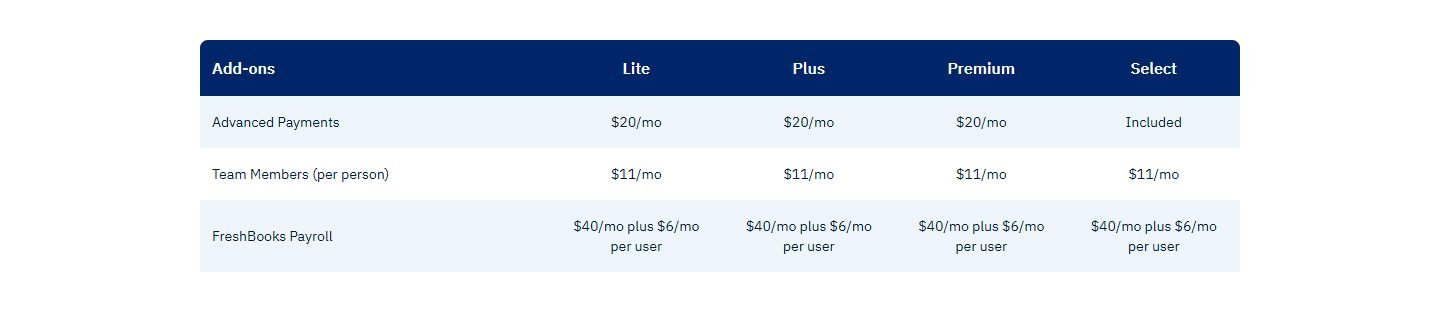
Worked example from those list prices: a US consultant on Plus with one assistant pays $43 + $11 = $54 a month at full price, before card fees. The same two people on Xero’s US Growing plan pay $59, because Xero has no per-user fees. More on that trade-off in FreshBooks vs QuickBooks.
Pros and cons
Pros
- Unlimited time tracking and expenses on every plan
- Proposals, retainers and e-signatures from Plus
- Free trial with no credit card, plus a 30-day money-back guarantee
- Same simple plan structure in all 6 markets
- MTD VAT returns on every UK plan
Cons
- Client caps (5 / 50), counting archived clients
- Lite has no reconciliation or accountant access
- Every extra team member costs extra
- No inventory tools
- Payroll add-on only in the US
Who should use FreshBooks (and who shouldn’t)
Good fit: freelancers, consultants, agencies, and trades that quote and invoice, especially if you bill hourly or by project. See our freelancer guide and the construction guide.
Probably not: businesses that sell products and need inventory (see the ecommerce guide), growing teams where several people need logins, and businesses outside the US that want payroll built in.
See FreshBooks’ current offer (partner link, opens in a new tab)
FreshBooks alternatives
- QuickBooks Online: a free plan in the US and inventory on Plus; see our QuickBooks Online review.
- Xero: no per-user fees and wider regional tax tools; see our Xero review.
- Zoho Books: a free plan in many countries; see FreshBooks vs Zoho Books, our Zoho Books review and Zoho Books vs QuickBooks.
- Wave: a free invoicing option for US and Canadian freelancers; see the free software guide.
FAQ
How much does FreshBooks cost in 2026?
In the US, FreshBooks costs $23 (Lite), $43 (Plus) or $70 (Premium) a month, and Select is custom-priced. Team members are $11 a month each. In the UK, plans cost £16, £30 and £42; in Canada, C$26, C$42 and C$72.
Does FreshBooks have a free plan?
No. FreshBooks offers a 30-day free trial with no credit card required, and a 30-day money-back guarantee if you buy a plan.
What counts toward the FreshBooks client limit?
Both active and archived clients count. Lite allows 5 billable clients, Plus 50, and Premium and Select are unlimited. Deleting a client frees a slot, and their invoices stay accessible.
Does FreshBooks do payroll?
In the US, FreshBooks Payroll is an add-on at $40 a month plus $6 per user. In Canada, FreshBooks points customers to a partner, PaymentEvolution. We didn’t find a payroll add-on on the other markets’ pricing pages.
