Freelancer guide · Prices checked 18–19 October 2026
Best Accounting Software for Freelancers in 2026
Disclosure: Some links in this article are affiliate links (marked “partner link”). If you click through and buy, we may earn a commission at no extra cost to you. It doesn’t change the prices, limits or picks below. Learn more.
Short answer
FreshBooks is the best fit if you bill clients by the hour or by project. Zoho Books has the most useful free plan for freelancers in most countries. Wave is the simplest free option if you’re in the US or Canada. If you’re a UK sole trader, look at FreeAgent first, because it handles Self Assessment and Making Tax Digital out of the box.
Every price below was read on the provider’s official pricing page on 18–19 October 2026, and the screenshots were taken on 19 October. Prices change often, so check the live page before you pay. For every business type, see our ranking of the best accounting software for small business.
How we picked
Freelance bookkeeping is mostly the same handful of jobs: send invoices, chase them, log expenses, and have something tidy to hand over at tax time. So we compared each product on the things that actually change your week:
- Invoicing and getting paid — online payments, reminders, and how many invoices or clients the plan allows.
- Time and project tracking — whether billable hours can turn into an invoice without retyping.
- Expenses and receipts — bank feeds and receipt capture, and whether they cost extra.
- Tax-time readiness — reports for your accountant, plus local filing such as UK Making Tax Digital.
- Price at freelancer scale — what a one-person business really pays, not the headline promo.
- Where you live — several of these tools aren’t sold everywhere, and that matters more than any feature.
Facts come from each provider’s official pricing page. We haven’t run these tools through a hands-on test for this article, so you won’t see star ratings here. Where something is our opinion, we say so. If you’d rather get a shortlist for your own country and budget, try the accounting software finder.
The picks at a glance
| Software | Best for | Free option | Lowest paid plan (US) | Free trial | Watch out for |
|---|---|---|---|---|---|
| FreshBooks | Client billing, hourly work | No | Lite $23/mo | 30 days | Lite caps you at 5 billable clients |
| Zoho Books | Free plan, most countries | Yes | Standard $20/mo ($15 billed yearly) | Yes (14 days in the US) | Free plan eligibility limits vary by country |
| Wave | Free invoicing, US & Canada | Yes | Pro $19/mo or $190/yr | — (free plan instead) | Only for US and Canadian businesses |
| Xero | Growing freelancers, multi-currency | No | Early $27/mo | One month free offer in the US | Early allows 20 invoices and 5 bills |
| QuickBooks Online | Working with an accountant | Yes (very limited) | Simple Start $38/mo | 30 days | Free plan: 2 invoices a month |
| FreeAgent | UK sole traders | Free with some UK banks | Sole trader £19/mo (UK) | 30 days | UK only |
US prices are monthly list prices before promotions and taxes. FreeAgent is UK-only, so its price is in pounds, excluding VAT. Compare these side by side, country by country, in our comparison table.
FreshBooks: best for client billing and time tracking
FreshBooks feels like it was designed around a freelancer’s invoice rather than an accountant’s ledger. Every US plan includes unlimited time tracking and unlimited expenses, and estimates, recurring invoices, late-payment reminders and online card payments all come as standard. If you bill by the hour, logging time against a project and turning it into an invoice is the core of how the product works.
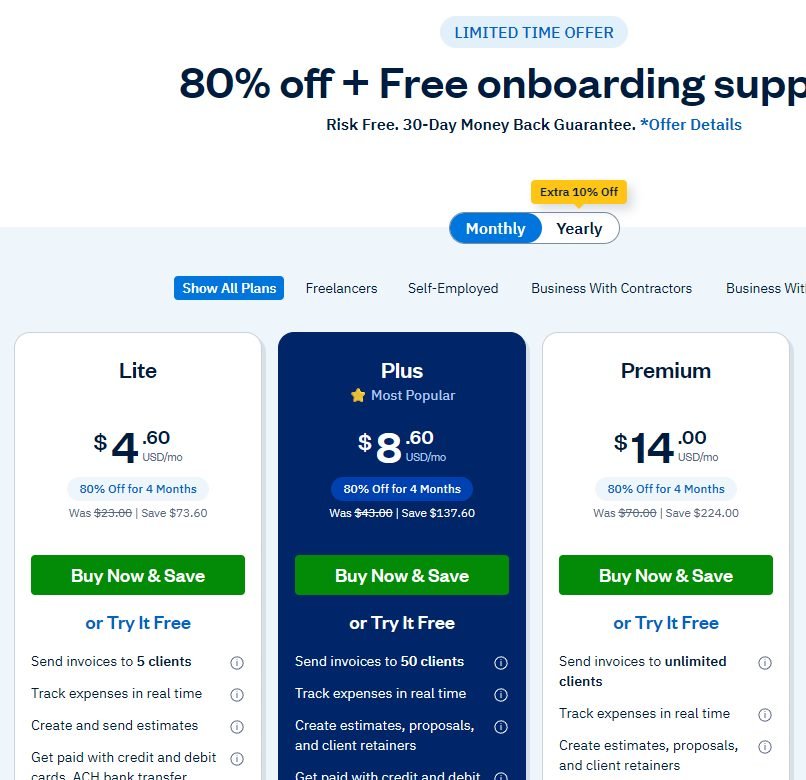
The catch is how FreshBooks charges. Plans are priced by the number of billable clients, not by features alone: Lite covers 5 clients, Plus covers 50, and Premium is unlimited. Archived clients count toward the limit too. Lite also leaves out bank reconciliation, accountant access and receipt scanning, which start on Plus.
Pros
- Unlimited time tracking and expenses on every plan
- Estimates, retainers (Plus), recurring invoices and reminders
- Local pricing in USD, CAD, GBP, AUD, ZAR and EUR; UK Lite includes MTD VAT returns
- 30-day free trial with all features
Cons
- Lite is capped at 5 billable clients
- Extra team members cost $11 a month each (US)
- Reconciliation and accountant access need Plus ($43)
Pricing (US): Lite $23, Plus $43, Premium $70 a month, with custom Select pricing. On the day we checked, new customers could get 80% off for 4 months, and yearly billing takes off an extra 10%. Outside the US the plans are the same but prices are local: the UK is £16, £30 and £42, Canada C$26, C$42 and C$72.
Try FreshBooks free (partner link, opens in a new tab)
Zoho Books: best free plan
Zoho Books has a $0 plan built for solopreneurs and micro businesses, and it’s the most widely available free plan on this list. Every country edition we checked lists a Free plan, from the US and UK to India, Australia and the UAE. Zoho runs separate country editions with their own tax handling. In the UK, for example, the Free plan lists MTD VAT filing, MTD for Income Tax and Self Assessment (SA100). That’s unusual at $0. We compare every free option, including Wave and QuickBooks Free, in our best free accounting software guide.
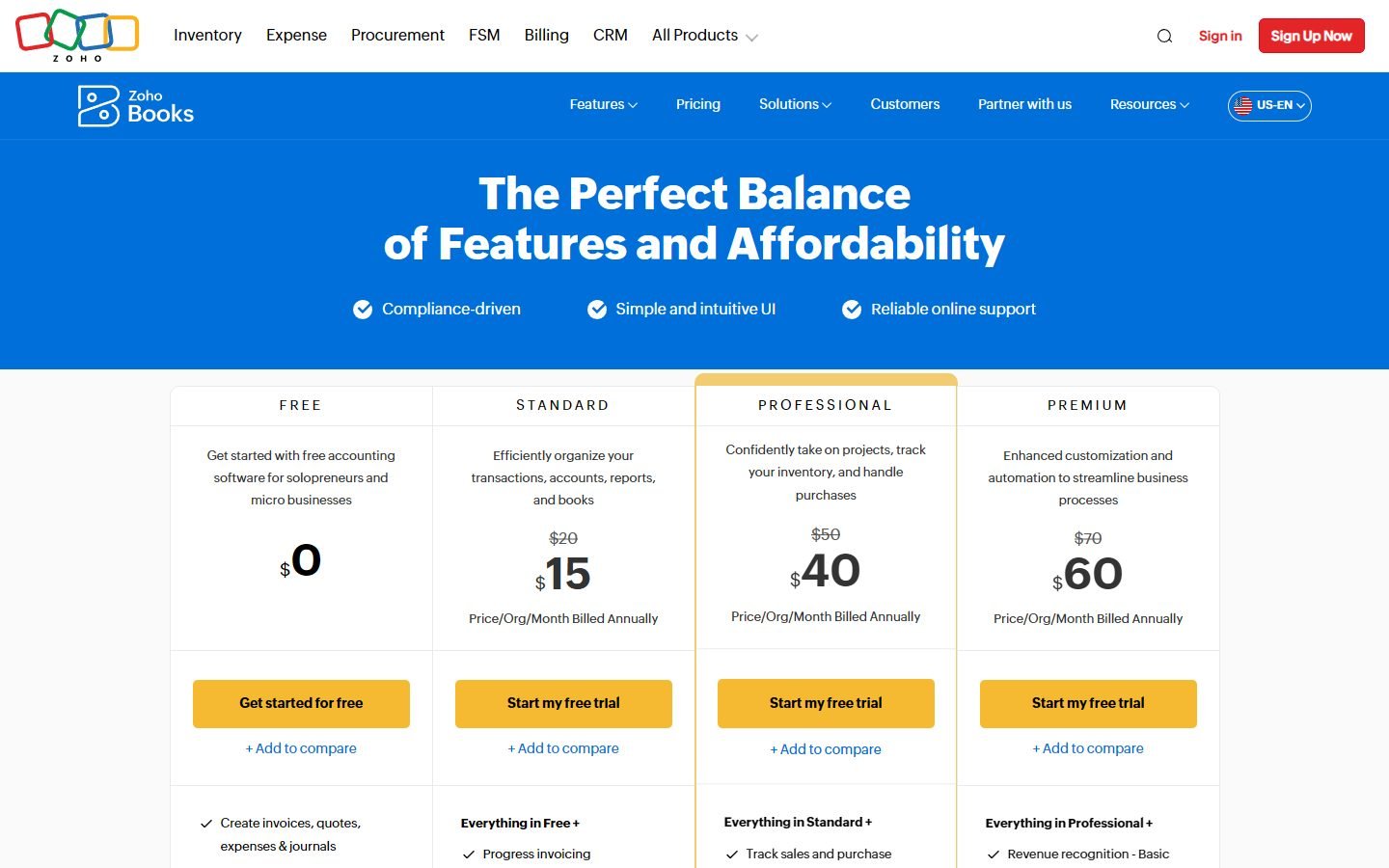
The free plan has eligibility limits, and they differ by country. The Australian page, for instance, limits it to businesses with revenue under A$50K a year. Read the limits on your own edition’s page before you rely on it. Paid plans start with Standard at $20 a month ($15 a month billed yearly) in the US. In the US, projects and inventory arrive on Professional ($50, or $40 billed yearly).
Pros
- A free plan in every edition we checked
- Separate country editions with local tax handling
- 1 user plus your accountant on the free plan (UK, India and Australia editions)
Cons
- Free plan eligibility limits vary by country
- You can’t change an edition’s country or base currency later
- The lowest advertised prices need yearly billing
Start with Zoho Books (partner link, opens in a new tab)
Wave: best free option in the US and Canada
Wave’s Starter plan costs nothing and doesn’t cap invoices: unlimited estimates, invoices, bills and bookkeeping records, plus a mobile app for invoicing on the go. For a US or Canadian freelancer who just needs to send invoices and keep the books straight, that’s hard to argue with. Full details in our Wave review.
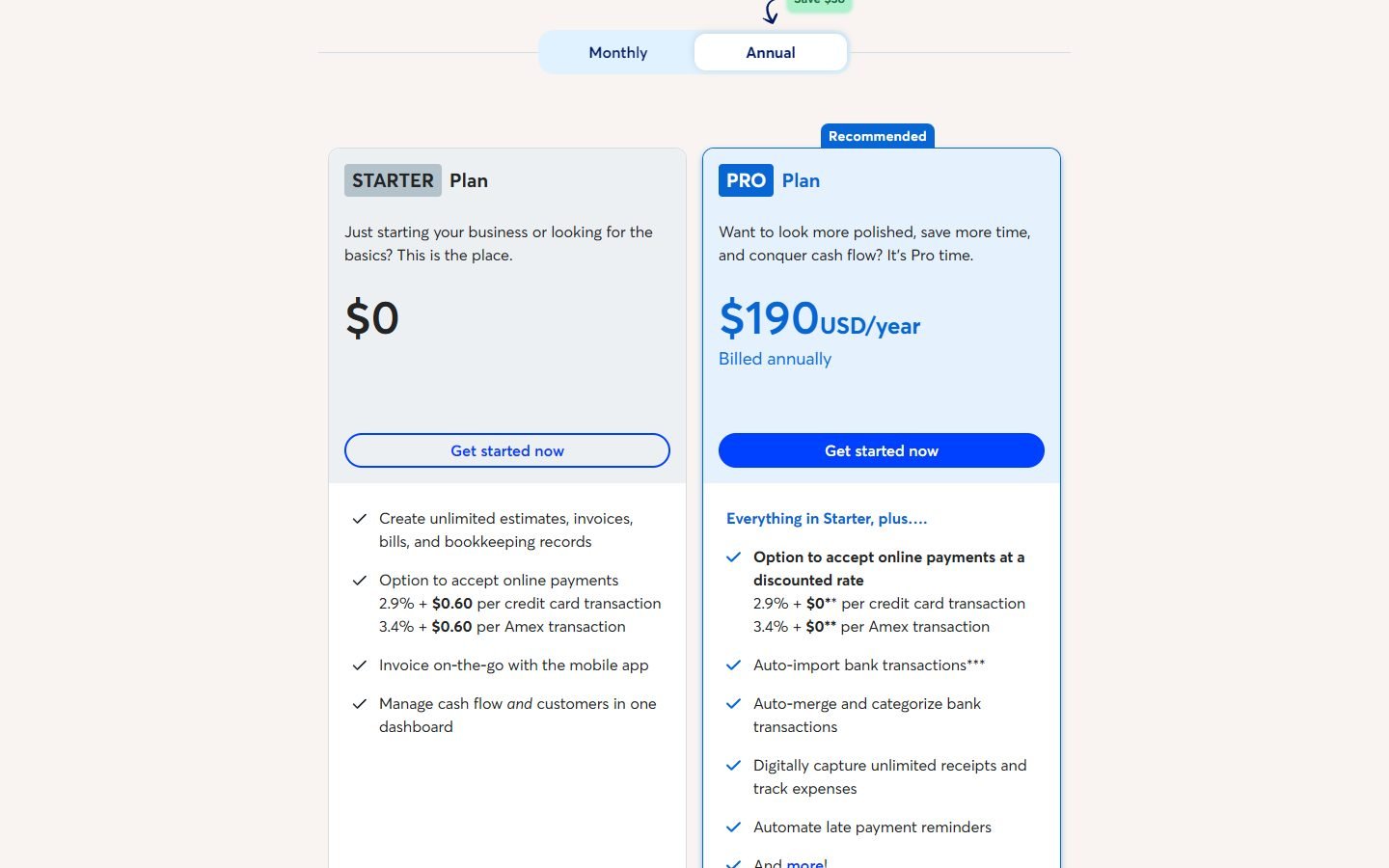
Two things to know. First, Wave says it is only available to businesses in the United States and Canada. If you’re anywhere else, skip it. Second, the free plan leaves out some things you might assume are included. Automatic bank imports and unlimited receipt capture come with Pro ($19 a month, $190 a year, or CA$25 in Canada). On Starter, receipts are an $8-a-month add-on. Card payments on Starter cost 2.9% + $0.60 per transaction.
Pros
- Free plan with unlimited invoices and bookkeeping records
- Pro is inexpensive at $190 a year
- Optional done-for-you bookkeeping through Wave Advisors
Cons
- US and Canada only
- Bank feeds need Pro
- Payroll is a paid add-on (from $40 a month)
Xero: best for freelancers who are growing
Xero makes the most sense if your freelance work is turning into a business: subcontractors, overseas clients, an accountant who wants access. There are no per-user fees on any plan, and its regional editions cover the US, UK, Australia, New Zealand, Canada and more. Other countries can buy global plans priced in USD.
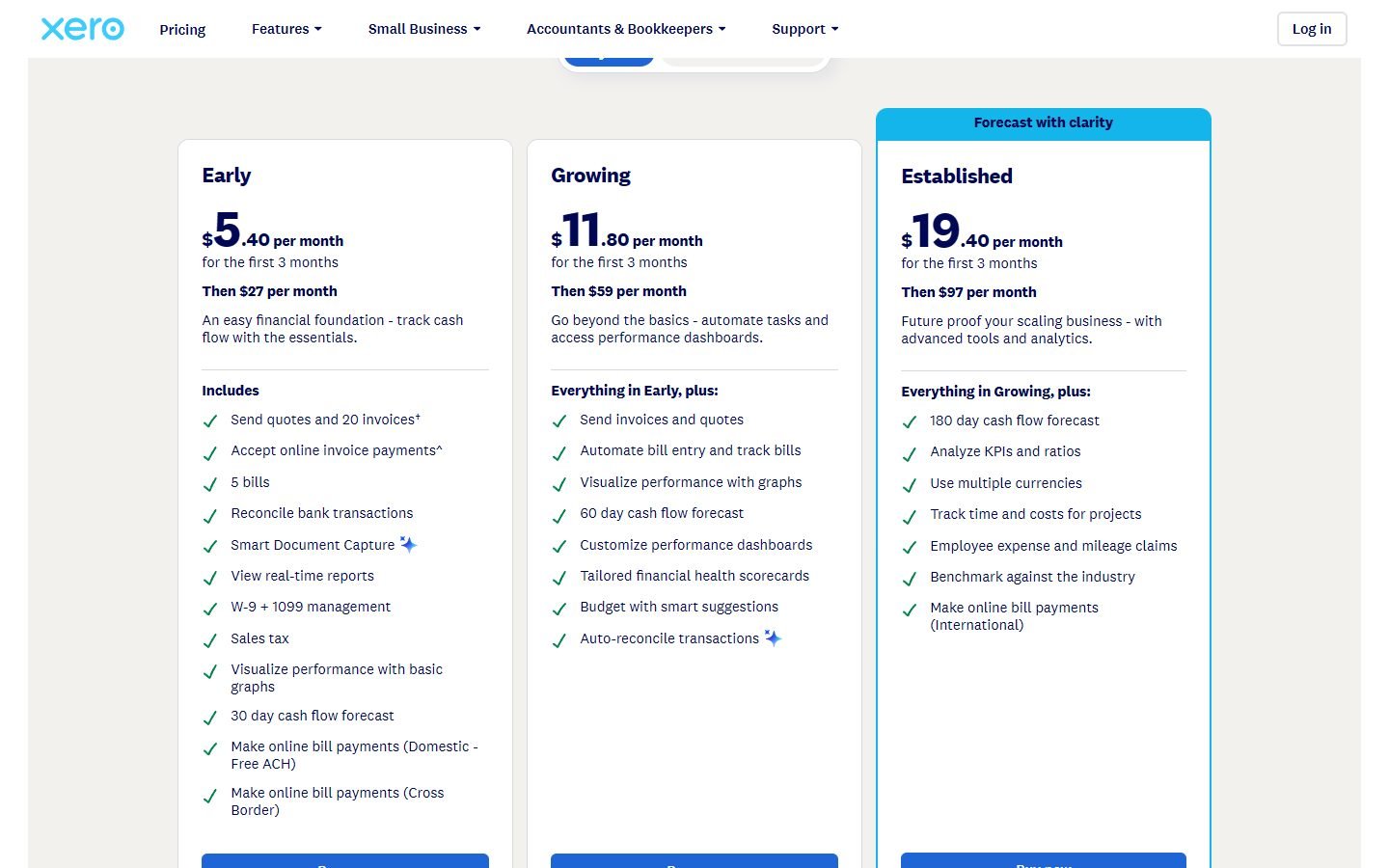
Be careful with the entry plan, though. Xero’s US Early plan ($27 a month) allows 20 invoices and 5 bills, and a busy freelancer can hit that. Unlimited invoicing starts at Growing ($59). Multi-currency, project time tracking and expense claims are on Established ($97). Older reviews often quote $25 for Early; the official page now shows $27. When we checked, new US customers could get 80% off for the first 3 months.
Pros
- Unlimited users on every plan
- Strong bank reconciliation and a large app marketplace
- UK Ignite (£18) includes MTD VAT and is MTD for Income Tax ready
Cons
- Early caps invoices (20) and bills (5)
- Multi-currency and projects need the top US plan
- Pricier than FreshBooks or Zoho at freelancer scale
See Xero’s current offer (partner link, opens in a new tab)
QuickBooks Online: best if your accountant already uses it
If your accountant already works in QuickBooks, that alone can be a reason to choose it. Simple Start ($38 a month in the US) includes 1 user plus access for 2 accountants. Intuit also has a Free plan that needs no credit card.
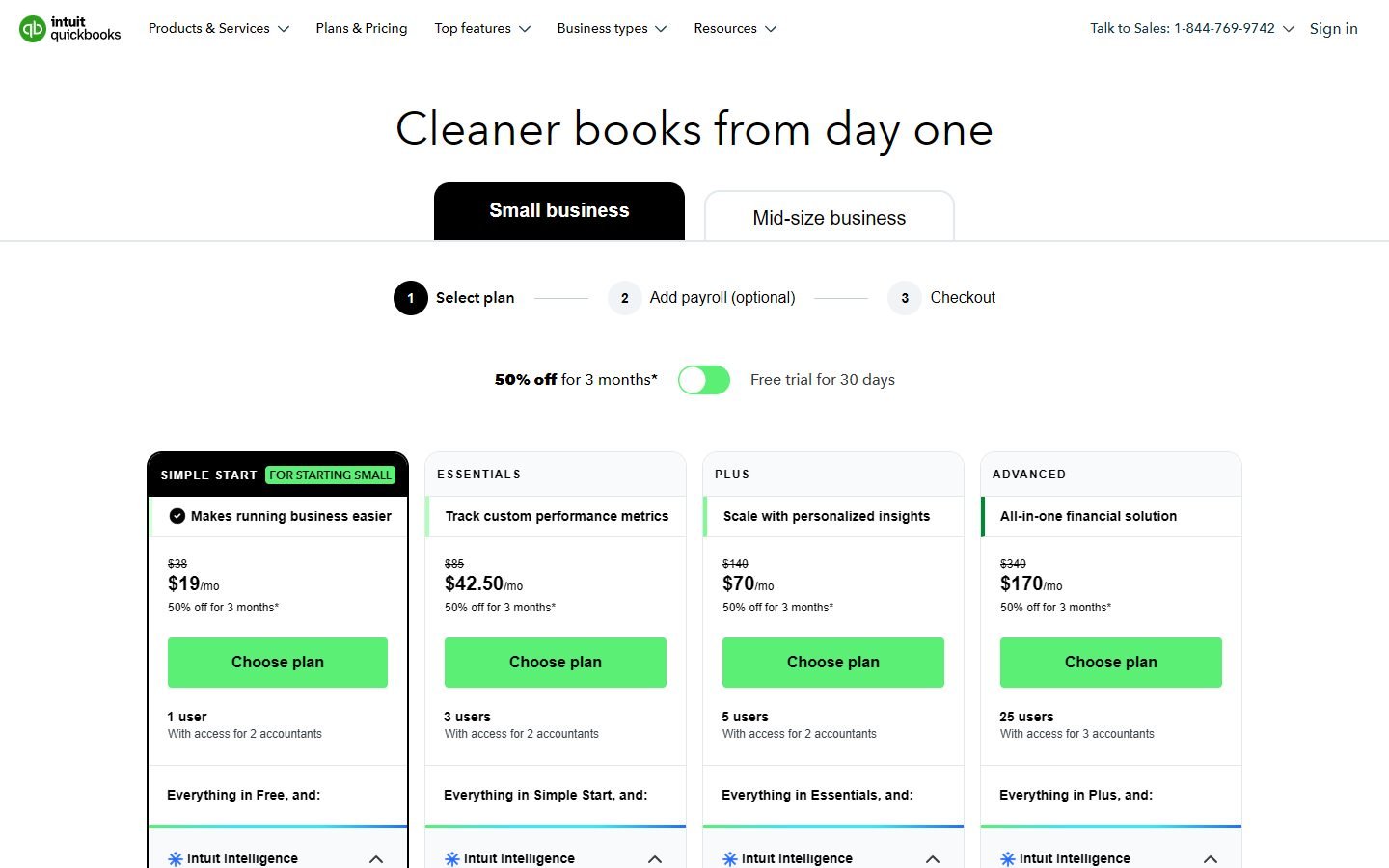
Read the Free plan’s limits before you get excited. It allows 2 invoices a month and 1 bank connection, with no accountant access. That’s enough to try the product, but not enough to run a freelance business on. QuickBooks also isn’t sold in India or France any more. Elsewhere, Intuit offers local editions or global plans billed in USD.
Pros
- Simple Start includes access for 2 accountants
- Free plan with no credit card required (US)
- Choice of a discount or a 30-day free trial
Cons
- Free plan allows just 2 invoices a month
- The most expensive entry plan here ($38)
- Not available in India or France
FreeAgent: best for UK sole traders
If you’re a UK sole trader, FreeAgent is built around your tax year. It helps with your Self Assessment, generates MTD-compatible VAT returns and files them to HMRC, and covers invoicing, expenses, projects and time tracking. Sole traders pay £19 a month (excluding VAT). The limited-company plan is £33.
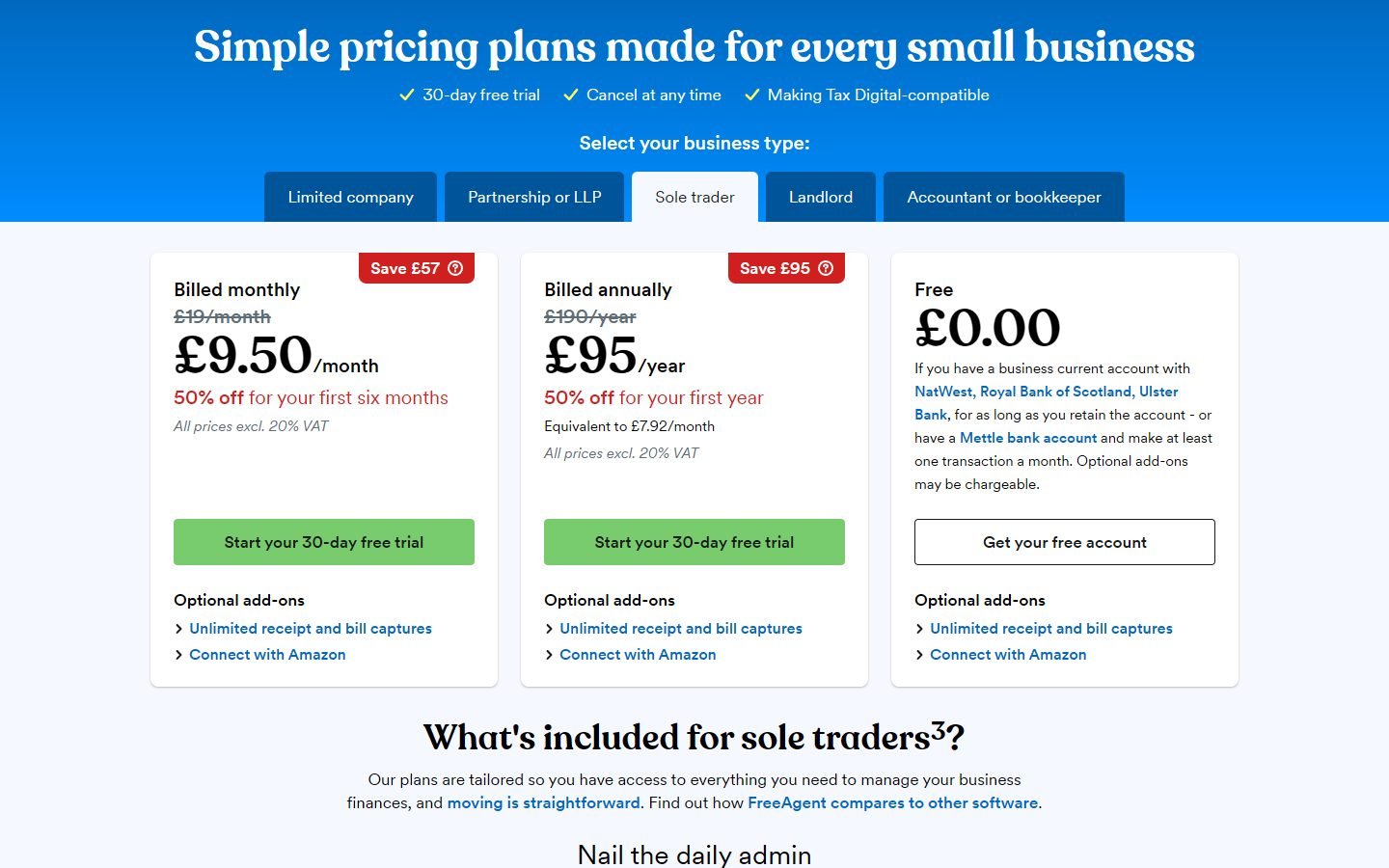
FreeAgent can also cost you nothing. It’s free for as long as you keep an eligible NatWest, Royal Bank of Scotland or Ulster Bank business account, or a Mettle account with at least one transaction a month. The downside is simple: it’s only for UK businesses and UK tax. UK freelancers should also read our Making Tax Digital software guide.
Limits and extra costs to watch
The headline price is rarely what a freelancer ends up paying. These limits come straight from the pricing pages:
- Invoice and client caps: Xero Early allows 20 invoices, QuickBooks Free allows 2 a month, and FreshBooks Lite allows 5 billable clients.
- Extra people: FreshBooks charges $11 a month per team member in the US. Xero doesn’t charge per user.
- Receipts and bank feeds: Wave puts bank imports and unlimited receipts behind Pro. FreshBooks receipt scanning starts on Plus.
- Promos end: the 50–80% discounts last 3–6 months, then the regular price applies. Budget for the regular price.
- Payment processing: taking card payments on invoices costs a per-transaction fee on top of the subscription (e.g. 2.9% + $0.60 on Wave Starter).
Current discounts for every provider, by country, are listed in our free trials and offers section.
Which one should you choose?
- You bill clients by the hour or project: FreshBooks.
- You want $0, and you’re outside the US/Canada: Zoho Books.
- You want $0, in the US or Canada: Wave (or Zoho Books if you need its free plan’s extra tools).
- You’re growing, hiring help or invoicing in other currencies: Xero.
- Your accountant lives in QuickBooks: QuickBooks Simple Start (see FreshBooks vs QuickBooks).
- You’re a UK sole trader: FreeAgent, or the Zoho Books UK Free plan if budget comes first.
Still torn? Our finder takes your country, business type and must-have features, and ranks these options with the right local plan and price.
FAQ
What is the best free accounting software for freelancers?
In the US and Canada, Wave’s Starter plan is free with unlimited invoices. Elsewhere, Zoho Books has a free plan in every country edition we checked, though eligibility limits vary by country. QuickBooks also has a free plan, but it allows only 2 invoices a month.
Is FreshBooks or Wave better for freelancers?
FreshBooks is better if you track billable time and want accountant-ready reports; it starts at $23 a month. Wave is better if you mainly need free invoicing and you’re in the US or Canada, because it isn’t available elsewhere.
Which accounting software works for UK freelancers and Making Tax Digital?
FreeAgent, Xero (from Ignite), Zoho Books (including its Free plan), FreshBooks UK (Lite) and QuickBooks UK (Simple Start) all list MTD-compliant VAT returns on their UK pricing pages.
Can accounting software file my taxes?
Some can file specific returns. FreeAgent and Zoho Books UK, for example, list Self Assessment and MTD VAT filing. Most tools prepare the reports your accountant or tax software needs, rather than filing income tax for you. Check what your country edition lists.
