Business type guide · Prices checked 18–19 October 2026
Best Accounting Software for Construction & Contractors in 2026
Disclosure: Some links in this article are affiliate links (marked “partner link”). If you click through and buy, we may earn a commission at no extra cost to you. It doesn’t change the prices, limits or picks below. Learn more.
Short answer
For most small US contractors, QuickBooks Online Plus is the safest pick: it tracks profit per project, and several construction job-management apps connect to it. Xero is better value if you want unlimited users for the office and the site. In the UK, Sage Accounting Standard and Zoho Books both handle CIS, and Zoho’s free plan even tracks retention payments.
This guide is for trades, subcontractors and small builders. Prices were read on each provider’s official pricing page on 18–19 October 2026, and screenshots were taken on 19 October. If you run lots of jobs at once with certified payroll, jump to when to move to construction software. Not in construction? Compare accounting software for every type of small business on our homepage.
What contractors need from accounting software
Construction money moves differently from a shop or an agency. You quote a job, take a deposit, bill in stages, wait on retention, and pay subcontractors along the way, often while three other jobs are running. Generic “best accounting software” lists skip most of that. We compared each product on:
- Profit per job — can you see costs and income for each project, and on which plan?
- Getting paid in stages — estimates, deposits, progress invoicing and retention.
- Subcontractor tax — 1099s in the US, the Construction Industry Scheme (CIS) in the UK.
- Bills and suppliers — materials invoices pile up fast, so bill entry matters.
- People — how many users you get, since the office and the site both need access.
- Price — the regular monthly price, not just the first three months.
Facts come from the providers’ official pricing pages; we haven’t run a hands-on test for this article, so there are no star ratings here. Want a shortlist for your own country? The accounting software finder has a Construction & Contractors option.
The picks at a glance
| Software | Best for | Project / job tracking from | Subcontractor tax | Users | Watch out for |
|---|---|---|---|---|---|
| QuickBooks Online | US contractors | Plus, $140/mo (US) | UK: CIS from Sole Trader Plus (£10) | 5 on Plus, 25 on Advanced | User caps on every plan |
| Xero | Growing firms, office + site | Established, $97/mo (US); Ultimate, £70 (UK) | US: W-9 + 1099 on every plan. UK: CIS calculations from Ignite | Unlimited | UK CIS returns are a £5/mo add-on |
| Sage Accounting | UK contractors on CIS | Not listed on the pricing page | UK: CIS on Standard (£43) | 3 on Standard, unlimited on Plus | US edition was retired in 2024 |
| Zoho Books | Budget, UK subcontractors | Professional, $50/mo (US) | UK: CIS tracking free; CIS returns on Professional (£24) | 1 on Free, 3 on Standard (UK) | Lowest prices need yearly billing |
| FreshBooks | Small trades who mostly invoice | Project profitability on Premium, $70/mo | Not listed | 1 + $11/mo per team member (US) | Plans capped by billable clients |
US prices are monthly list prices before promotions and tax; UK prices exclude VAT. Compare all of these, plan by plan in your own country, in our comparison table.
QuickBooks Online: best for US contractors
QuickBooks comes up first in most 2026 construction software roundups, and its plan structure explains why. Plus ($140 a month) adds project profitability, budgets, inventory tracking and up to 40 classes and locations, which is handy if you tag costs by job or by crew. Advanced ($340 a month) goes further: Intuit lists a “construction financials solution” and “advanced project financials” on that tier, plus 25 users.
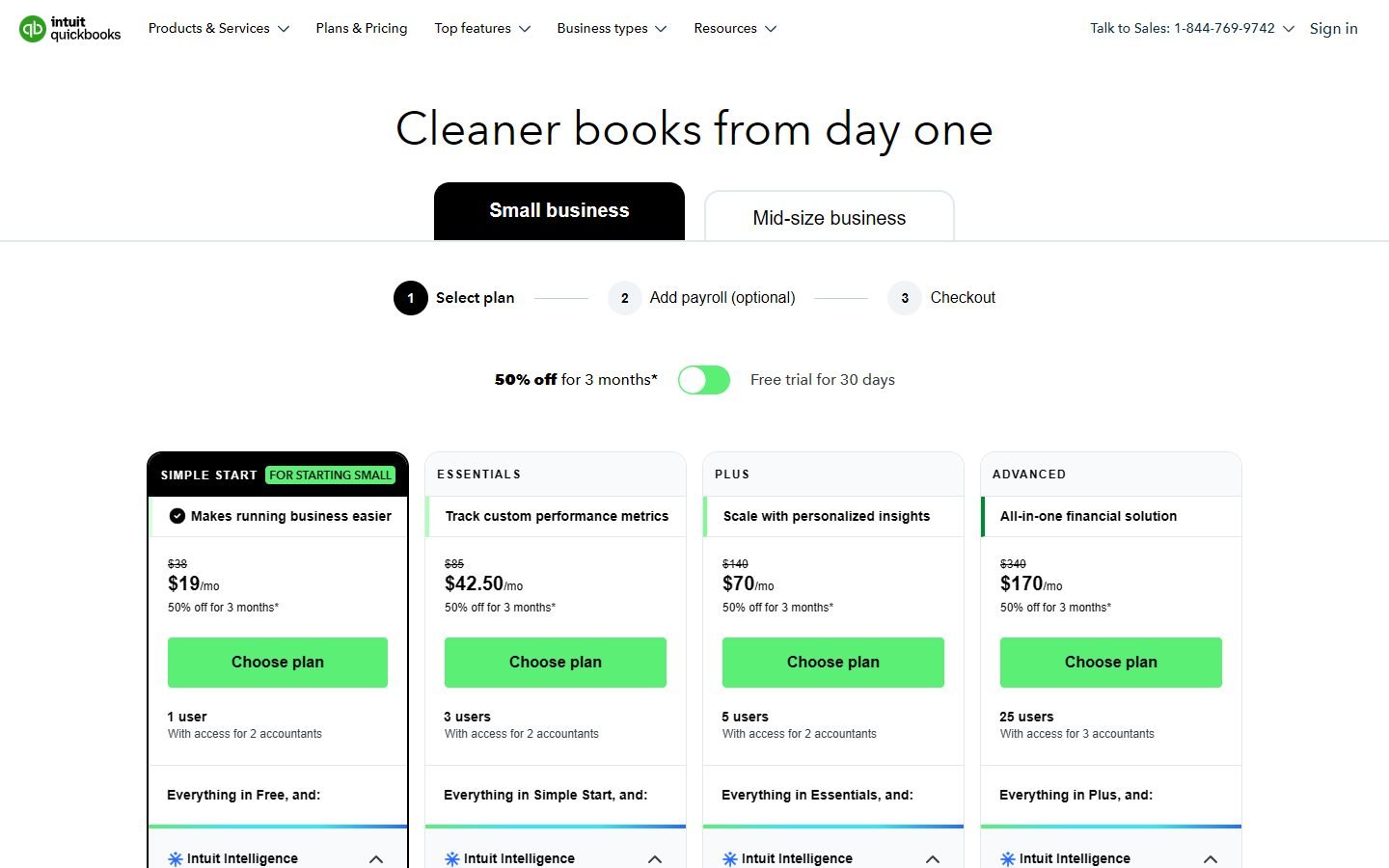
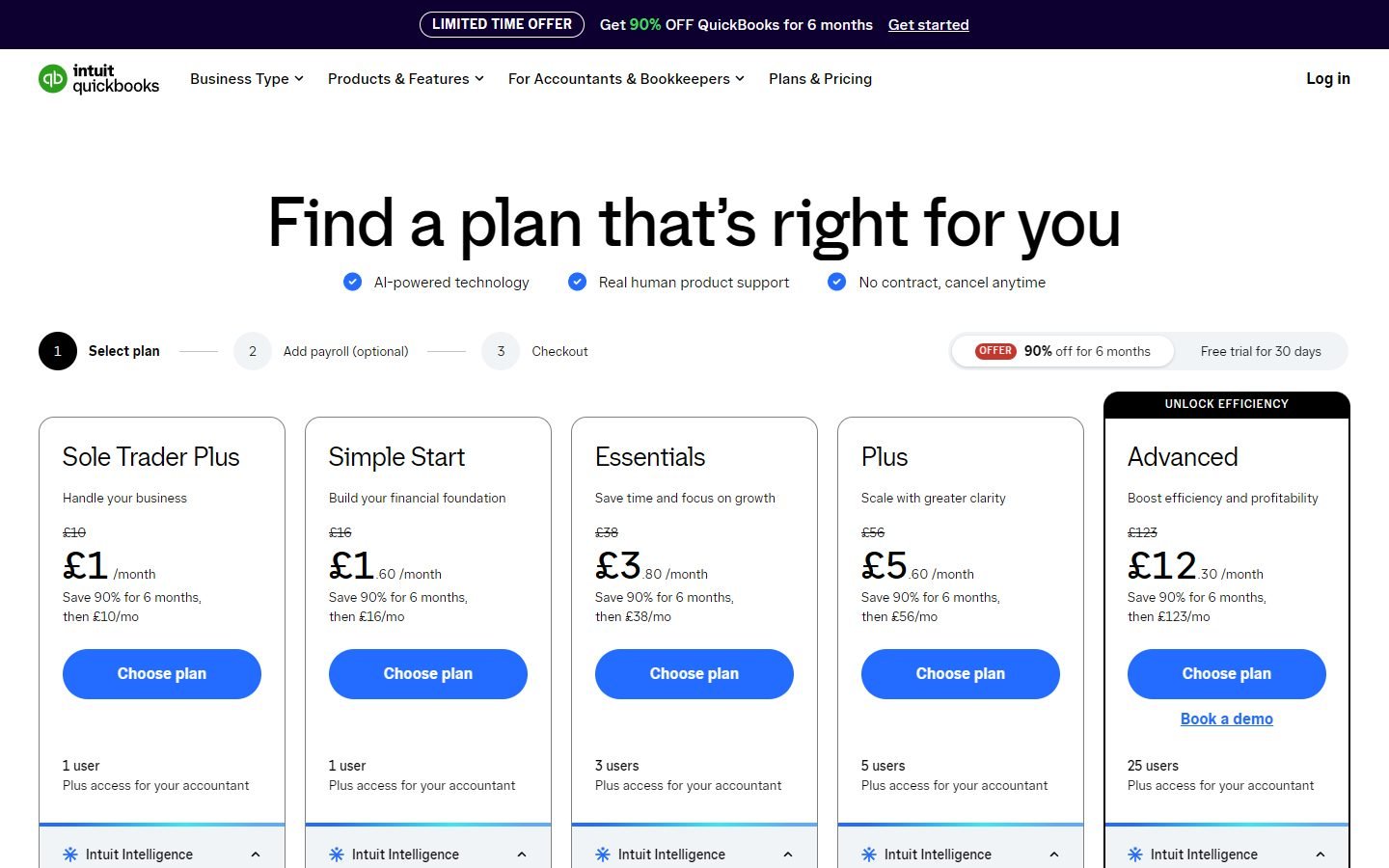
The trade-off is cost and user limits. Simple Start is a single user, Essentials is 3, Plus is 5, so a growing firm can get pushed up a tier just to add a site manager. In the UK, QuickBooks is a strong CIS option at the low end: Sole Trader Plus (£10 a month) lists “Calculate and submit CIS”.
Pros
- Project profitability from Plus; construction tools listed on Advanced
- UK plans calculate and submit CIS from £10
- 30-day free trial or a launch discount
Cons
- Every plan caps users (1, 3, 5, 25)
- Plus at $140 a month is the real starting point for job tracking
- Payroll is a paid add-on
Xero: best value with unlimited users
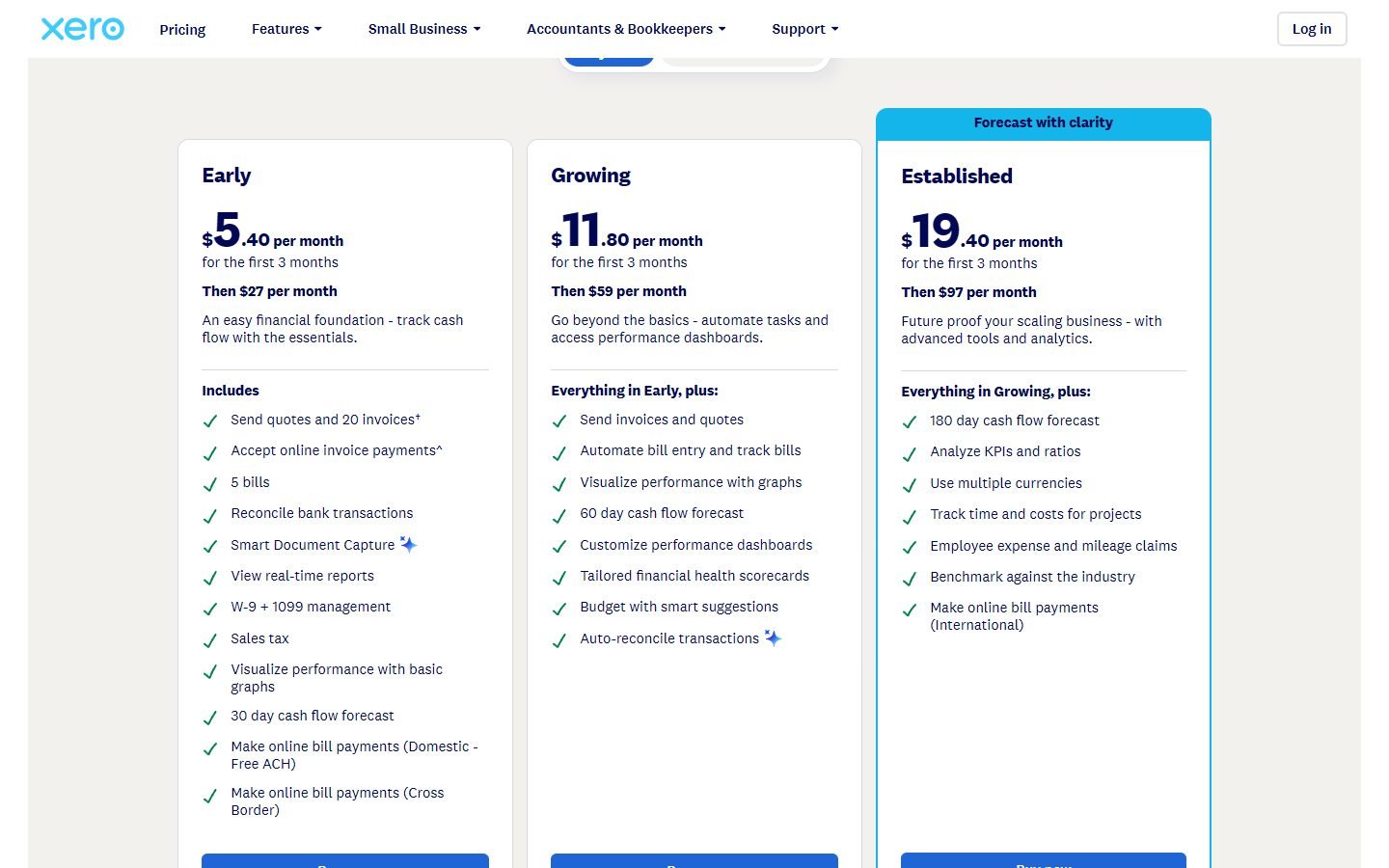
Xero doesn’t charge per user on any plan, which suits contractors where the owner, a bookkeeper and a site lead all need to log in. In the US, project time and cost tracking comes with Established ($97 a month), along with expense claims and multi-currency. Every US plan, even Early, includes W-9 and 1099 management for paying subcontractors.
In the UK, every Xero plan includes automatic CIS calculations and reports, starting with Ignite at £18 a month. Actually submitting CIS returns to HMRC is an optional £5-a-month add-on, and project tracking sits on Ultimate (£70). Note that Ignite caps you at 20 invoices and 10 bills, which a busy builder will outgrow quickly.
Pros
- Unlimited users on every plan
- W-9 + 1099 tools on every US plan; CIS calculations on every UK plan
- App Store for add-ons, including job-management tools
Cons
- Projects need the top plan (Established / Ultimate)
- Entry plans cap invoices and bills
- UK CIS submission costs £5 a month extra
See Xero’s current offer (partner link, opens in a new tab)
Sage Accounting: best for UK contractors on CIS
Sage aims its Standard plan squarely at “small businesses working with suppliers, CIS or with accrual accounting”. At £43 a month (excluding VAT) you get CIS, 3 users and payroll, which Sage now includes in every UK plan. For a small UK firm paying a few subcontractors and a couple of employees, that bundle is hard to beat on paper. Full details in our Sage Accounting review.
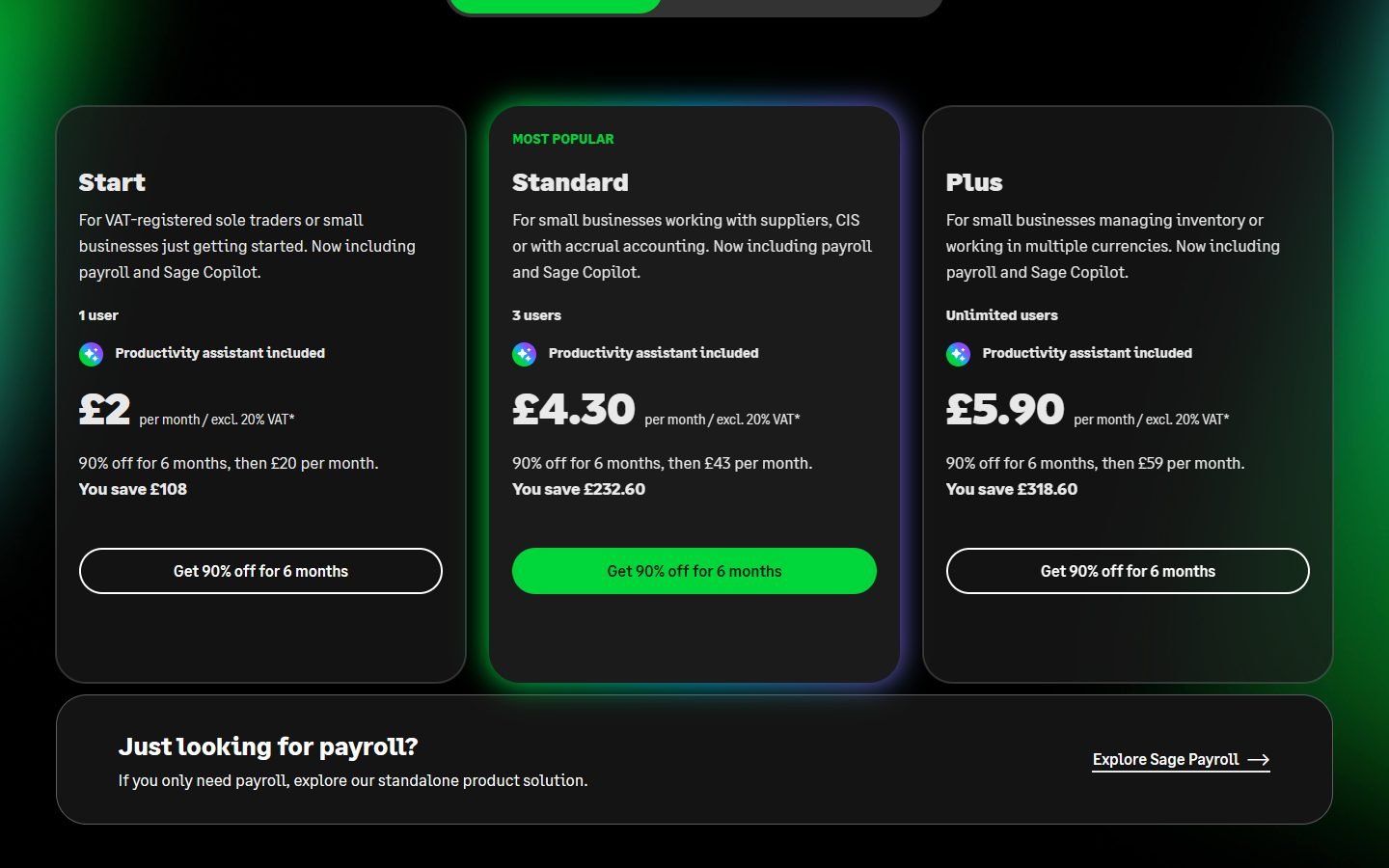
Two limits. Project or job tracking isn’t listed on Sage’s pricing page, so check the feature details before you rely on it. And Sage Accounting is no longer sold in the US: Sage retired the US edition at the end of 2024.
Pros
- CIS on Standard; payroll included in every UK plan
- MTD-compatible VAT returns
- Unlimited users on Plus (£59)
Cons
- Job/project tracking not listed on the pricing page
- Start plan has no CIS and only 1 user
- Not available in the US
Zoho Books: best budget pick (and free in the UK)
Zoho Books is the surprise here. Its UK Free plan lists retention payments and CIS contractor tracking, plus MTD VAT filing, for £0. Standard (£12 a month, or £10 billed yearly) adds progress invoicing and bank feeds, and Professional (£24, or £20 yearly) submits CIS returns to HMRC and adds bills, purchase orders and inventory.
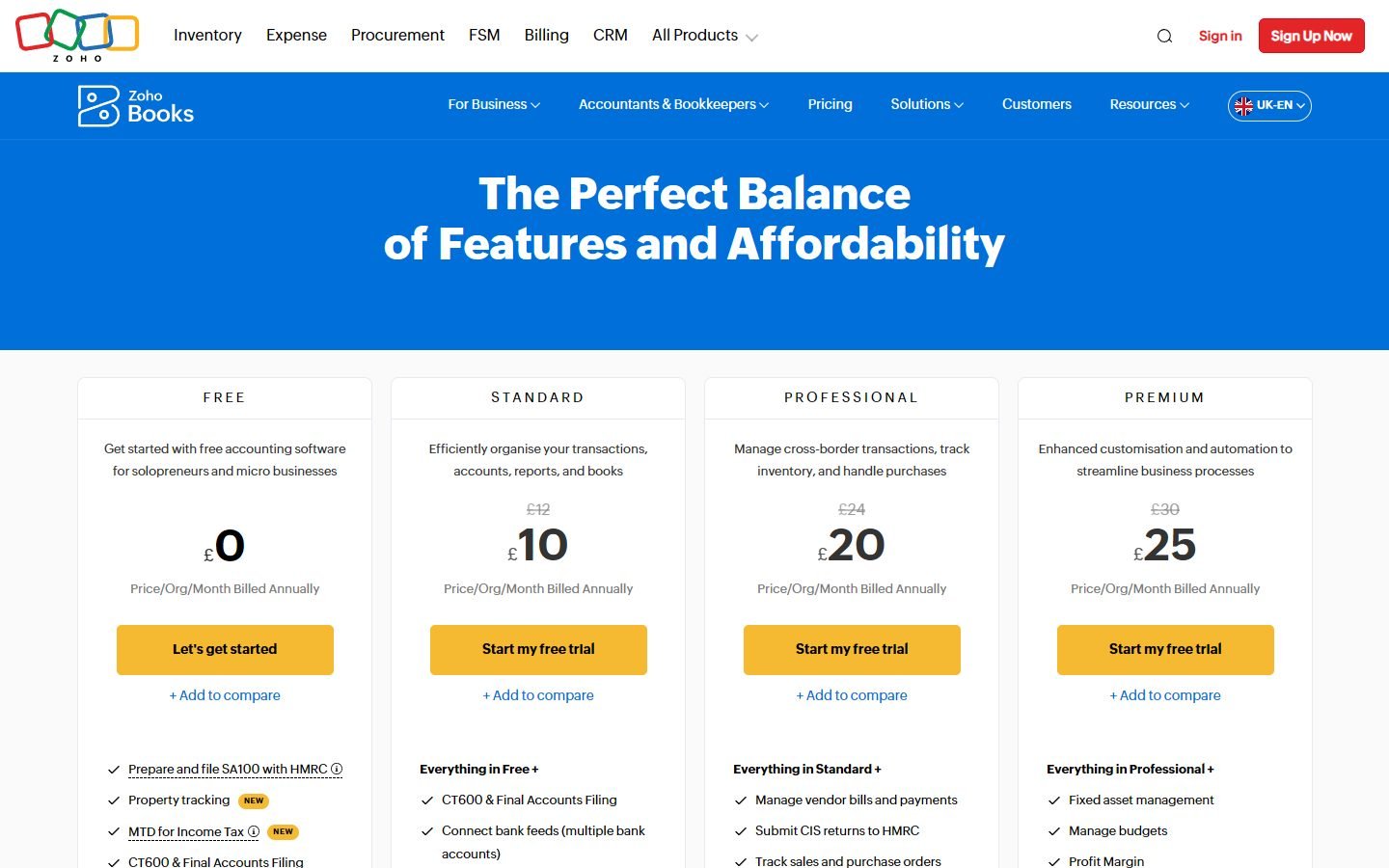
In the US, Zoho Books Professional ($50 a month, $40 billed yearly) is where projects and inventory arrive. The free plan has eligibility limits that vary by country, and you can’t switch an organisation’s country edition later, so set it up in the right country from day one.
Pros
- Retention payments and CIS tracking on the UK Free plan
- Progress invoicing from Standard
- Low prices, especially billed yearly
Cons
- Free plan is 1 user + 1 accountant
- CIS submission needs Professional
- Edition country can’t be changed later
Start with Zoho Books (partner link, opens in a new tab)
FreshBooks: best for small trades who mostly invoice
If you’re a one- or two-person outfit doing kitchens, decks or repairs, most of your admin is quoting and getting paid. FreshBooks is good at exactly that: estimates, deposits, recurring invoices and automated late-payment reminders on every plan, with e-signatures and proposals from Plus. Premium ($70 a month) adds project profitability and accounts payable for supplier bills.

It’s less suited to firms with crews and subcontractors. Plans are capped by billable clients (5 on Lite, 50 on Plus), each extra team member costs $11 a month in the US, and subcontractor tax tools like 1099 or CIS aren’t listed on the pricing page.
Try FreshBooks free (partner link, opens in a new tab)
UK CIS: which plan handles it?
If you pay or work as a subcontractor under the Construction Industry Scheme, this is the table that matters. It shows where each product lists CIS on its UK pricing page. For VAT and MTD for Income Tax as well, see our UK accounting software guide.
| Software | CIS on the pricing page | Cheapest plan with it |
|---|---|---|
| QuickBooks UK | Calculate and submit CIS | Sole Trader Plus, £10/mo |
| Xero UK | CIS calculations and reports; submitting CIS returns is a £5/mo add-on | Ignite, £18/mo (+£5) |
| Zoho Books UK | Track CIS contractors (Free); submit CIS returns to HMRC (Professional) | Free for tracking; Professional £24/mo (£20 yearly) to submit |
| Sage Accounting UK | CIS on Standard | Standard, £43/mo |
All prices exclude VAT and are the regular price after any introductory discount.
When to move to construction-specific software
General accounting tools work well for trades, subcontractors and small builders. They start to strain when you run many jobs at once and need things like work-in-progress (WIP) reporting, certified payroll for public contracts, or detailed change-order tracking. At that point, dedicated construction systems (for example Sage 100 Contractor or Foundation) are built for the job. A common middle step is to keep QuickBooks or Xero and add a job-management app from their marketplace before replacing your accounts entirely.
Which one should you choose?
- US contractor who wants job profitability: QuickBooks Online Plus.
- Office and site staff all need access: Xero (no per-user fees).
- UK firm with subcontractors and a few employees: Sage Accounting Standard.
- UK subcontractor on a tight budget: Zoho Books Free, then Professional when you need to submit CIS returns.
- Small trade business that mainly quotes and invoices: FreshBooks.
Freelancing as a sole tradesperson? Our guide to accounting software for freelancers covers the cheaper end, including FreeAgent for UK sole traders.
FAQ
Is QuickBooks or Xero better for contractors?
QuickBooks Online Plus adds project profitability at $140 a month in the US and has construction tools on Advanced, but caps users. Xero tracks projects on Established ($97) and never charges per user, which suits firms with several people logging in. See our full Xero vs QuickBooks comparison.
Which accounting software handles CIS in the UK?
QuickBooks UK (from Sole Trader Plus, £10), Xero UK (CIS calculations from Ignite, £18, with a £5 add-on to submit returns), Zoho Books UK (tracking on Free, submitting returns on Professional) and Sage Accounting Standard (£43) all list CIS on their pricing pages.
Is there free accounting software for contractors?
Zoho Books has a free plan; in the UK it lists retention payments and CIS contractor tracking. It is limited to 1 user plus an accountant, and eligibility limits vary by country.
When should a contractor switch to construction-specific software?
When you run many jobs at once and need WIP reporting, certified payroll or detailed change-order tracking. Before that, many small firms add a job-management app to QuickBooks or Xero instead.
