Guide · Built from plan limits checked on official pages, 18–19 October 2026
How to Choose Accounting Software in 2026: A Country-First Checklist
Quick answer
Choose accounting software by ruling things out, in this order: (1) which tools are actually sold in your country and file your local tax, (2) how many people need logins, (3) how many invoices, bills or clients you handle, (4) whether you need payroll, inventory or multi-currency, and which plan tier puts them in reach, and (5) what it costs in year two, after the intro discount ends. Most small businesses are down to two or three options after step 2.
Every limit and price in this guide comes from the vendors’ official pricing pages, read on 18–19 October 2026. Regular prices, before tax. Once you’ve worked through the checklist, compare the best accounting software for small business on our homepage.
Most “how to choose” advice lists features every tool has: invoicing, bank feeds, reports. They won’t separate your options. The plan limits will: country availability, user caps, invoice caps, and which tier a feature sits on. This guide goes through those, with the real numbers.
Step 1: Start with your country
This is the biggest filter and the one most comparison lists skip. Several well-known tools simply aren’t sold everywhere:
| Software | Where it’s sold |
|---|---|
| Xero | Regional plans in the US, UK, Australia, New Zealand, Canada, South Africa, Singapore, Ireland, Hong Kong and Malaysia; global USD plans elsewhere |
| QuickBooks Online | Local editions in the US, UK, Canada, Australia, Ireland, Singapore, South Africa, Hong Kong, Malaysia and the UAE; global USD plans elsewhere; no longer sold in India or France |
| Zoho Books | 18 country editions (including India, the Gulf states, Kenya, Nigeria and Mexico) plus a Global edition |
| FreshBooks | Priced in USD, CAD, GBP, AUD, ZAR and EUR |
| Sage Accounting | UK, Ireland, Canada, South Africa, Kenya, Nigeria; not the US |
| Wave | US and Canada only |
| FreeAgent | UK only |
| MYOB | Australia and New Zealand only |
Then check the edition, not just availability. “Global” plans (Xero, QuickBooks, Zoho) generally don’t include local tax filing. What you want is the tool filing your returns: MTD VAT and MTD for Income Tax in the UK, GST and BAS in Australia, GST/HST in Canada, sales tax and 1099s in the US. Our country guides go deeper: UK and Australia.
Step 2: Count who needs a login
Count yourself, staff, a business partner and your bookkeeper. User rules differ more than prices do:
| Software | How users work |
|---|---|
| Xero | No per-user licence fees on any plan |
| QuickBooks Online | Capped by plan: 1 / 3 / 5 / 25 users, plus accountant access |
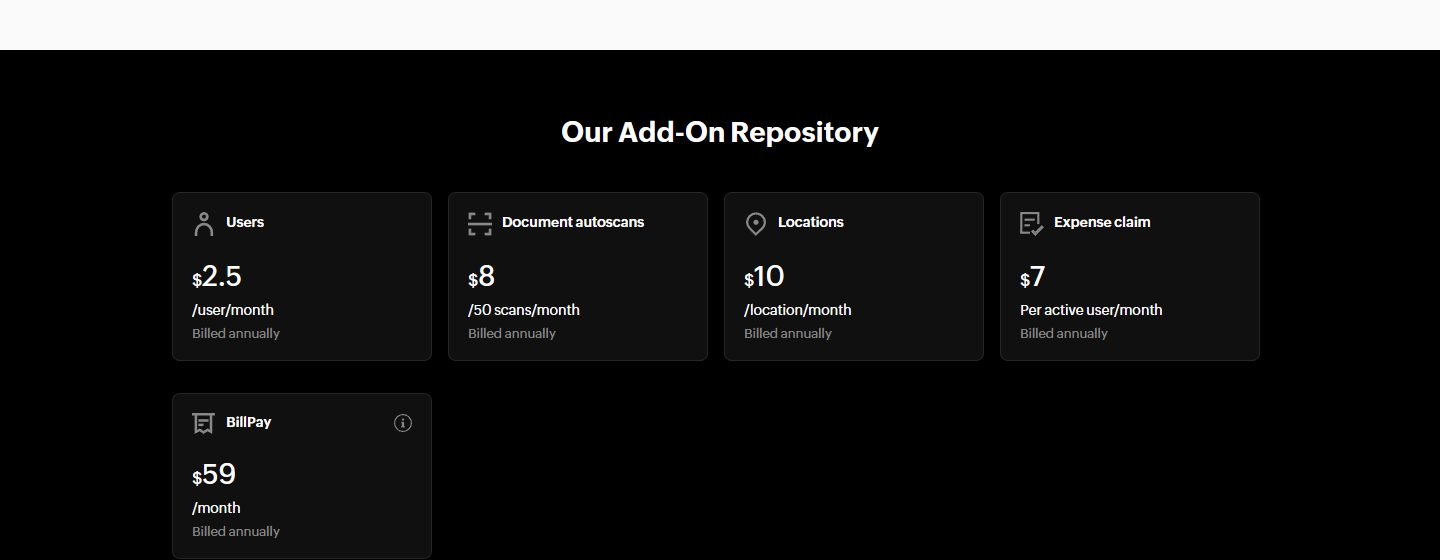
| Zoho Books | 3 / 5 / 10 / 10 / 15 by plan; extra users $3/month ($2.50 billed annually, US) |
| FreshBooks | 1 owner; each team member $11/month (US); Select includes 2 |
| Sage Accounting (UK) | 1 / 3 / unlimited users |
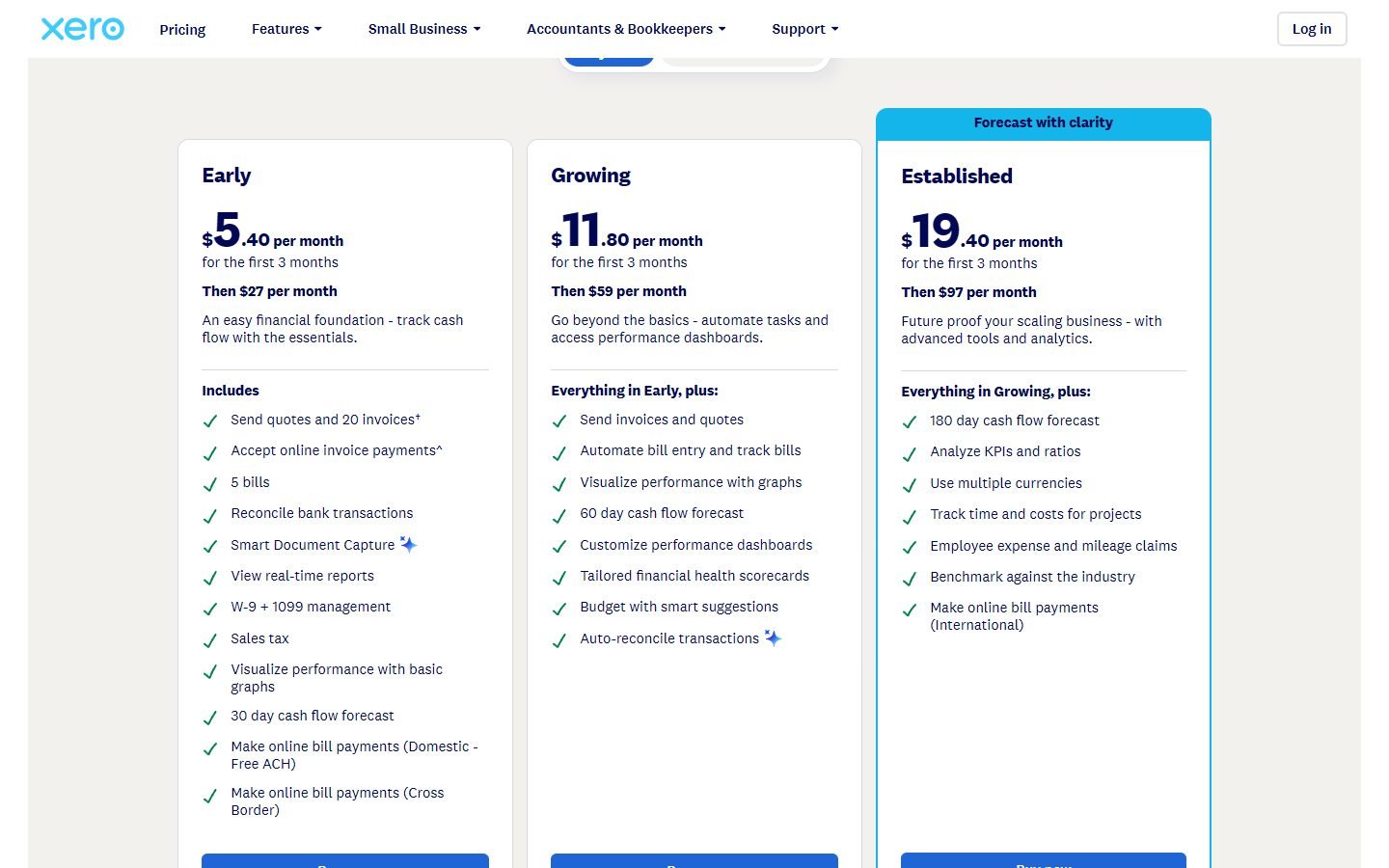
Worked example from US list prices: a 4-person team needs QuickBooks Plus ($140, since Essentials allows 3), but can use any Xero plan (Early from $27, though its invoice caps may push you to Growing at $59). On FreshBooks Plus it’s $43 + 3 × $11 = $76.
Step 3: Check the volume limits
Entry plans are cheap because they cap what you can do. These caps decide more choices than any feature list:
- Xero US Early: 20 invoices and 5 bills. UK Ignite: 20 invoices and 10 bills.
- QuickBooks Free (US): 2 invoices a month and 1 bank connection.
- Zoho Books Free: 1,000 invoices a year, free while revenue is under $50K (US). Paid plans also cap invoices yearly, from 5,000 on Standard to 100,000 on Elite.
- FreshBooks: 5 billable clients on Lite and 50 on Plus, and archived clients count.
- Sage Sole Trader Free (UK): 5 invoices a month and 1 bank account.
- Wave Starter: unlimited invoices, but bank imports need Pro.
Look at last year’s numbers: invoices sent, bills paid, active clients. Pick the plan with headroom, not the one you fit today.
Step 4: Find the tier with payroll, inventory or multi-currency
Most tools offer these features, but on different tiers. Here’s where each one starts:
| Software (market) | Payroll | Inventory | Multi-currency |
|---|---|---|---|
| Xero (US) | Add-on via Gusto: $36 + $6/person | Inventory Plus add-on (Growing and up) | Established ($97) |
| Xero (AU) | Included on every plan | — | Comprehensive (A$107) |
| QuickBooks (US) | Workforce bundles from $88 + per-employee fee | Plus ($140) | Essentials ($85) |
| Zoho Books (US) | Not part of the plans we checked | Professional ($50) | Professional ($50) |
| FreshBooks (US) | Add-on: $40 + $6/user | Not offered | — |
| Sage (UK) | Included: 1 employee (Start, Standard), 5 (Plus), then £1.85 each | Plus (£59) | Plus (£59) |
| Wave (US) | Add-on: $40 + $6/employee + $6/contractor | Not offered | — |
“—” means we didn’t verify it for that market. For payroll costed by country, see accounting software with payroll; for stock, see accounting software with inventory; for foreign currencies, see multi-currency accounting software. Product sellers should also read our ecommerce guide.
Step 5: Work out the year-two cost
Nearly every vendor leads with an intro discount, so compare what you’ll pay once it ends. Using each vendor’s own offer and regular price (US, entry or popular plan, monthly billing unless stated):
| Plan | Offer when checked | Year 1 | Year 2 |
|---|---|---|---|
| Xero Early ($27) | 80% off for 3 months | $259.20 | $324 |
| QuickBooks Simple Start ($38) | 50% off for 3 months | $399 | $456 |
| FreshBooks Plus ($43) | 80% off for 4 months | $378.40 | $516 |
| Zoho Books Standard (billed annually) | None | $180 | $180 |
| Wave Pro (billed annually) | None | $190 | $190 |
Our calculation: discounted months × discounted price, plus remaining months × regular price. Add any users, payroll employees and card fees from steps 2–4. It’s a quick way to see that a 90% discount for 3 months matters much less than the regular price you pay for years.
Step 6: Check how easy it is to leave
- Contracts: the plans covered here are billed monthly or yearly, with no long contracts. Wave says cancelling takes effect at the end of the billing period, and QuickBooks says you can switch or cancel at any time.
- Lock-in: Zoho Books says an organisation’s country and base currency can’t be changed after setup, so choose the right edition first.
- Trials: FreshBooks, QuickBooks and Sage offer 30-day trials in some or all markets, and Zoho a 14-day trial. Taking a discount instead of a trial often means paying from day one (QuickBooks doesn’t let you combine the two).
- Your accountant: ask which software they already support. It’s a legitimate tie-breaker.
The checklist
- List the tools sold in your country with a local edition that files your taxes.
- Count logins (you, staff, partner, bookkeeper) and cross off plans that can’t fit them.
- Compare last year’s invoices, bills and clients with each plan’s caps.
- Find the cheapest tier that includes payroll, inventory or multi-currency, if you need them.
- Work out year-one and year-two cost, including add-ons.
- Check trial vs discount, lock-in, and what your accountant uses.
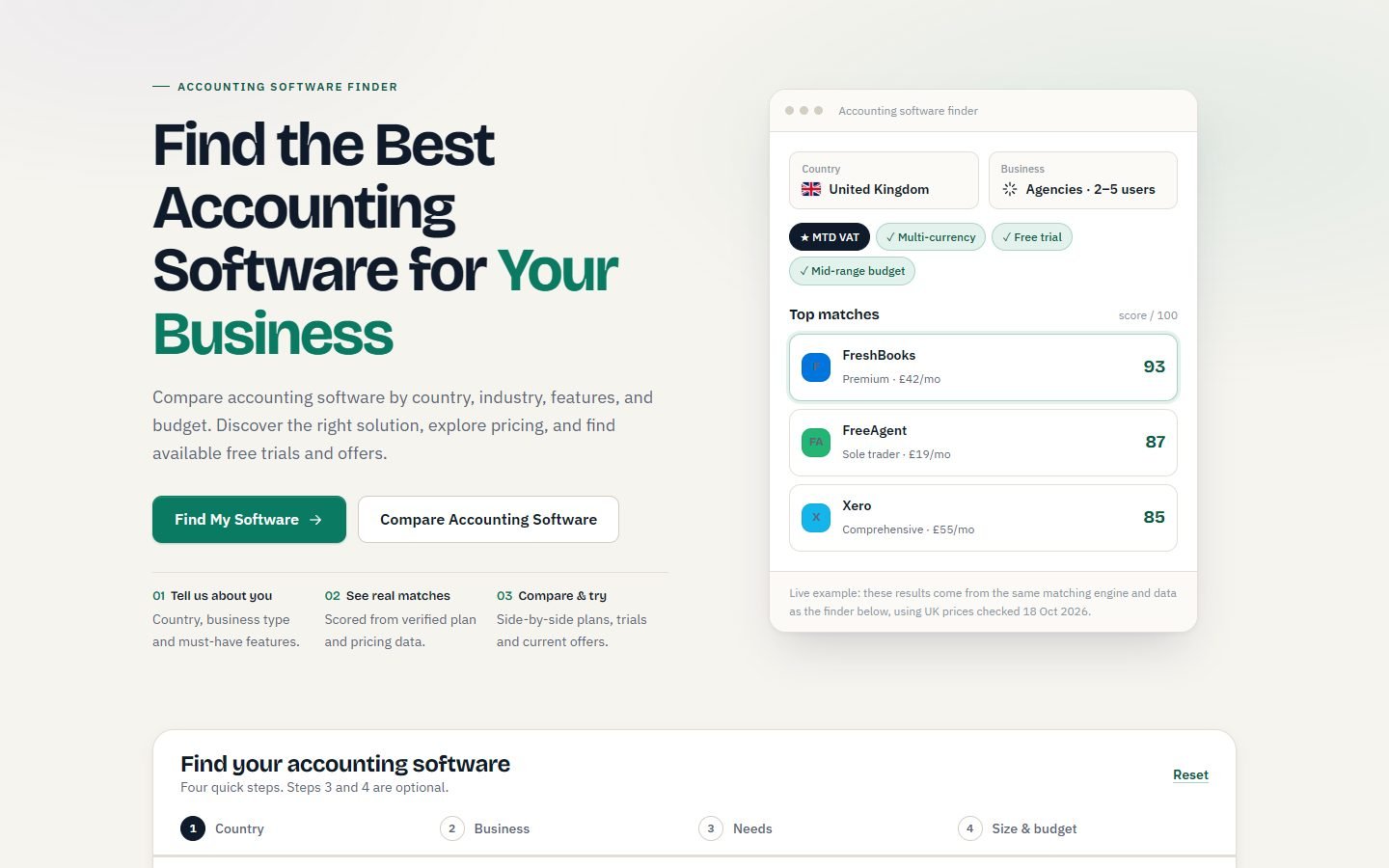
Our accounting software finder runs steps 1 to 4 for you from the same verified data: pick your country, business type and must-haves, and it scores each tool’s cheapest plan that fits.
Already have a shortlist? Go plan by plan in Xero vs QuickBooks, FreshBooks vs QuickBooks or Zoho Books vs QuickBooks, or read the reviews: Xero, QuickBooks Online, Zoho Books, FreshBooks, Wave and Sage.
FAQ
What is the most important factor when choosing accounting software?
Your country. Several popular tools aren’t sold everywhere (Wave is US and Canada only, MYOB is Australia and New Zealand only, FreeAgent is UK only, and Sage Accounting isn’t sold in the US). And only a local edition will usually file your local tax returns.
Is free accounting software good enough for a small business?
For a sole proprietor with low volume, often yes. Wave Starter (US and Canada) and Zoho Books Free are both free plans, not trials. Check the limits: Zoho’s US free plan is for revenue under $50K a year, Sage Sole Trader Free allows 5 invoices a month, and Wave needs Pro for bank imports. See our free accounting software guide.
How much should a small business pay for accounting software?
At regular US prices, entry plans run from $0 (Wave, Zoho Books Free) to about $20–$40 a month (Zoho Standard $20, FreshBooks Lite $23, Xero Early $27, QuickBooks Simple Start $38). Plans with inventory or multi-currency usually cost $50–$140 a month. Add users, payroll and card fees.
Should I take the free trial or the discount?
If you’re unsure, take the trial. Discounts usually start billing straight away, and some vendors, QuickBooks included, don’t let you combine the two. If you’ve already decided, a long discount (such as 90% off for 6 months) can save more than a 30-day trial.
