UK guide · Rules from GOV.UK and prices from official pages, checked 19 October 2026
Making Tax Digital Software: What It Must Do, Deadlines and Your Options (2026)
Disclosure: Some links in this guide are affiliate links (marked “partner link”). If you click through and buy, we may earn a commission at no extra cost to you. The rules and deadlines below come from GOV.UK and don’t depend on any product. Learn more.
Quick answer
For Making Tax Digital for Income Tax, your software must do three things: keep digital records of your self-employment and property income and expenses, send quarterly updates to HMRC, and submit your tax return by 31 January. You can use one all-in-one product, or keep your spreadsheets and add “bridging” software. The next quarterly update deadline is 7 November 2026. Before you buy, check the product is on HMRC’s software finder, and that it handles all your income sources and your accounting period.
This is a practical guide, not tax advice. Rules are from GOV.UK guidance read on 19 October 2026. If you want our product picks ranked, see best accounting software for the UK. Not just MTD? Find accounting software for your business by country and feature.
Who needs MTD software, and when
There are two parts to Making Tax Digital:
- MTD for VAT: GOV.UK says all VAT-registered businesses should already be signed up and filing VAT returns through compatible software.
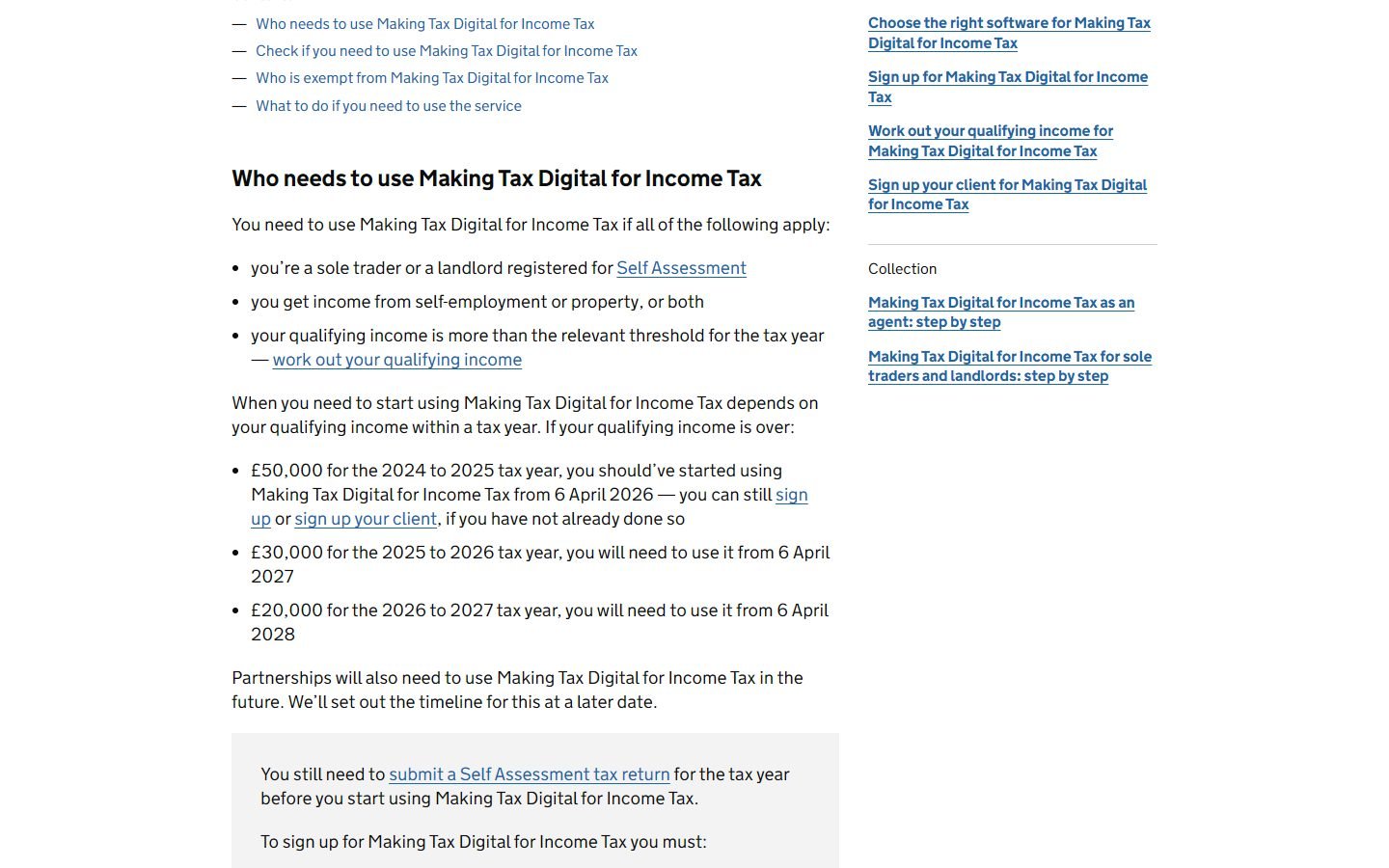
- MTD for Income Tax: sole traders and landlords registered for Self Assessment, based on “qualifying income”, meaning total self-employment and property turnover before expenses, from the previous tax return.
| Qualifying income on this tax return | Threshold | Start using MTD from |
|---|---|---|
| 2024 to 2025 | Over £50,000 | 6 April 2026 |
| 2025 to 2026 | Over £30,000 | 6 April 2027 |
| 2026 to 2027 | Over £20,000 | 6 April 2028 |
The 31 January deadline for your tax return and payment doesn’t change. What’s new is the software, the digital records and the quarterly updates.
What MTD software must do
According to HMRC’s “choose the right software” guidance (last updated 13 July 2026), you or your agent need commercial software that can:
- create, store and correct digital records of your self-employment and property income and expenses
- send your quarterly updates to HMRC
- add any other income sources (pensions, savings, dividends, a partnership profit share) and submit your tax return
Each digital record needs an amount, a date and a category, using the same categories as Self Assessment. Quarterly updates are totals, not tax returns: HMRC doesn’t receive individual invoices or receipts. Each update covers the tax year so far, and you still have to send one even if there was no income or expense that quarter.
HMRC also lists things to check: that the software supports all your income sources, works with your accounting period, allows more than one agent if you need that, and has HMRC Assist built in (it flags errors on your return). If you’re VAT-registered, check whether your VAT software also covers MTD for Income Tax.
All-in-one vs bridging software
HMRC describes two types of software:
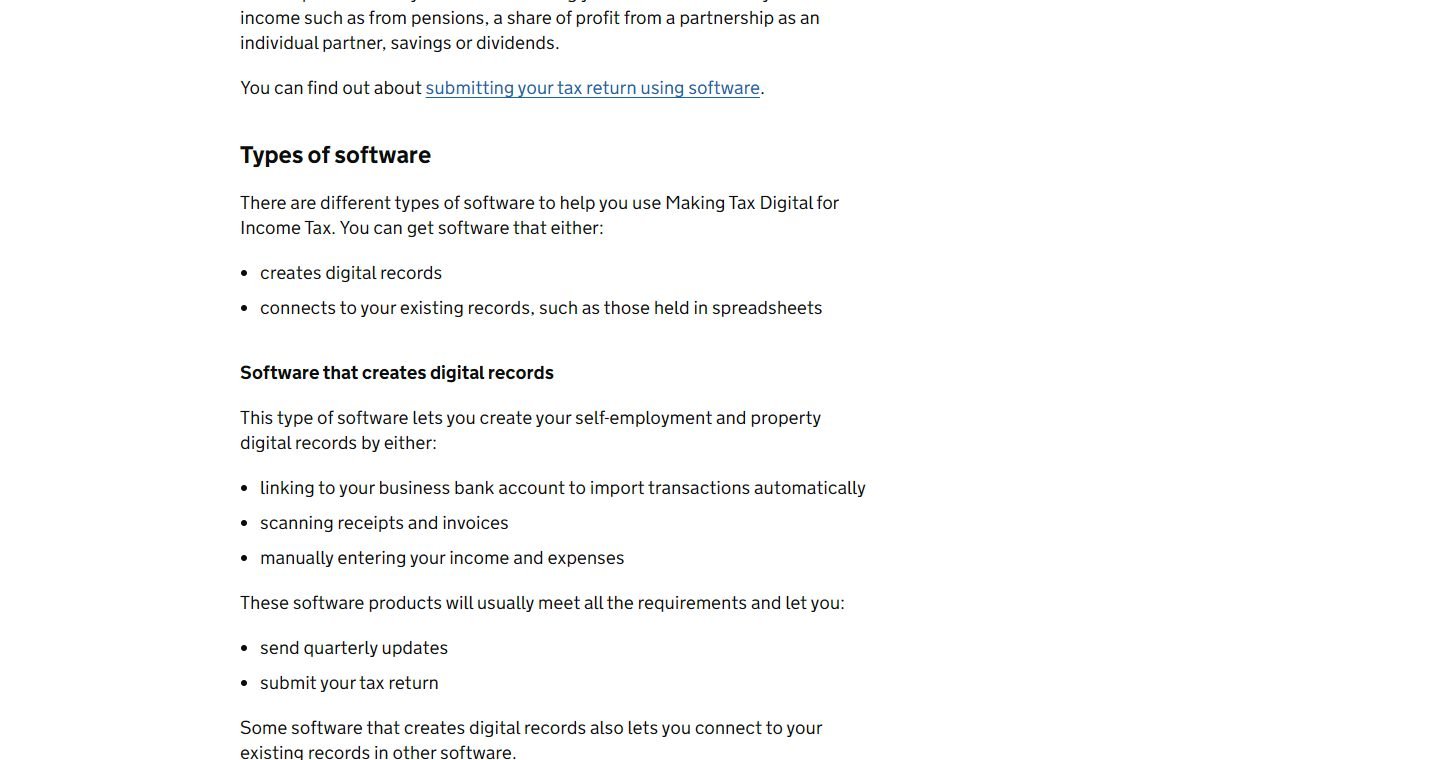
- Software that creates digital records. It links to your bank, scans receipts or takes manual entries, and usually sends quarterly updates and submits the return too. This is what Sage, Xero, QuickBooks, FreeAgent and Zoho Books do.
- Software that connects to your records, often called bridging software. You keep your spreadsheets, and the bridging product links to them and makes the submissions.
If you use more than one product, GOV.UK says the records must be digitally linked: linked spreadsheet cells, file imports and exports (CSV or XML), or an API transfer. Once a record has been sent in a quarterly update, you must not copy and paste or retype it into another product. You can only use one product per submission. A landlord can’t, for example, split property updates across two tools.
Quarterly update deadlines
The deadlines are the same whether you use standard periods (6 April to 5 April, the default) or calendar periods (1 April to 31 March):
| Standard update period | Calendar update period | Deadline |
|---|---|---|
| 6 April to 5 July | 1 April to 30 June | 7 August |
| 6 April to 5 October | 1 April to 30 September | 7 November |
| 6 April to 5 January | 1 April to 31 December | 7 February |
| 6 April to 5 April | 1 April to 31 March | 7 May (following tax year) |
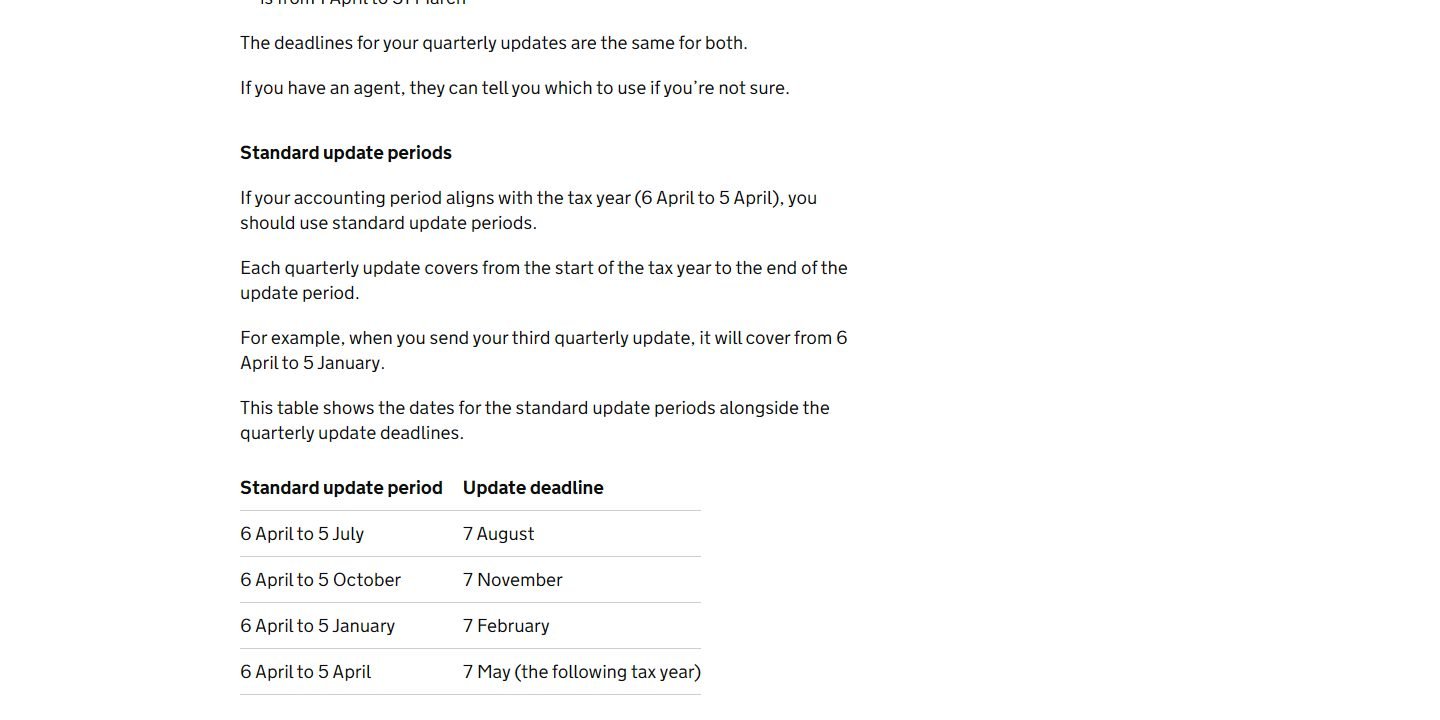
For the first MTD year, that means updates by 7 August 2026, 7 November 2026, 7 February 2027 and 7 May 2027, then the 2026 to 2027 tax return by 31 January 2028. Late updates and returns earn penalty points rather than an immediate fine, and GOV.UK says it won’t apply penalty points for late quarterly updates in the 2026 to 2027 tax year. You still need to send all four before you can submit your return.
Setting up: authorise, then check your period
- Authorise the software using the HMRC sign-in you used to sign up for MTD for Income Tax, and pass the identity check if asked. GOV.UK says you’ll need to reconnect every 18 months, and your software should remind you.
- Check your accounting period. Software defaults to standard periods. If your year runs 1 April to 31 March, switch to calendar periods before your first update; you can’t change it for the rest of the year after that.
- Check bank-feed transactions. GOV.UK notes you may need to add the Self Assessment category to imported transactions, and some won’t appear in full.
MTD-ready software and prices
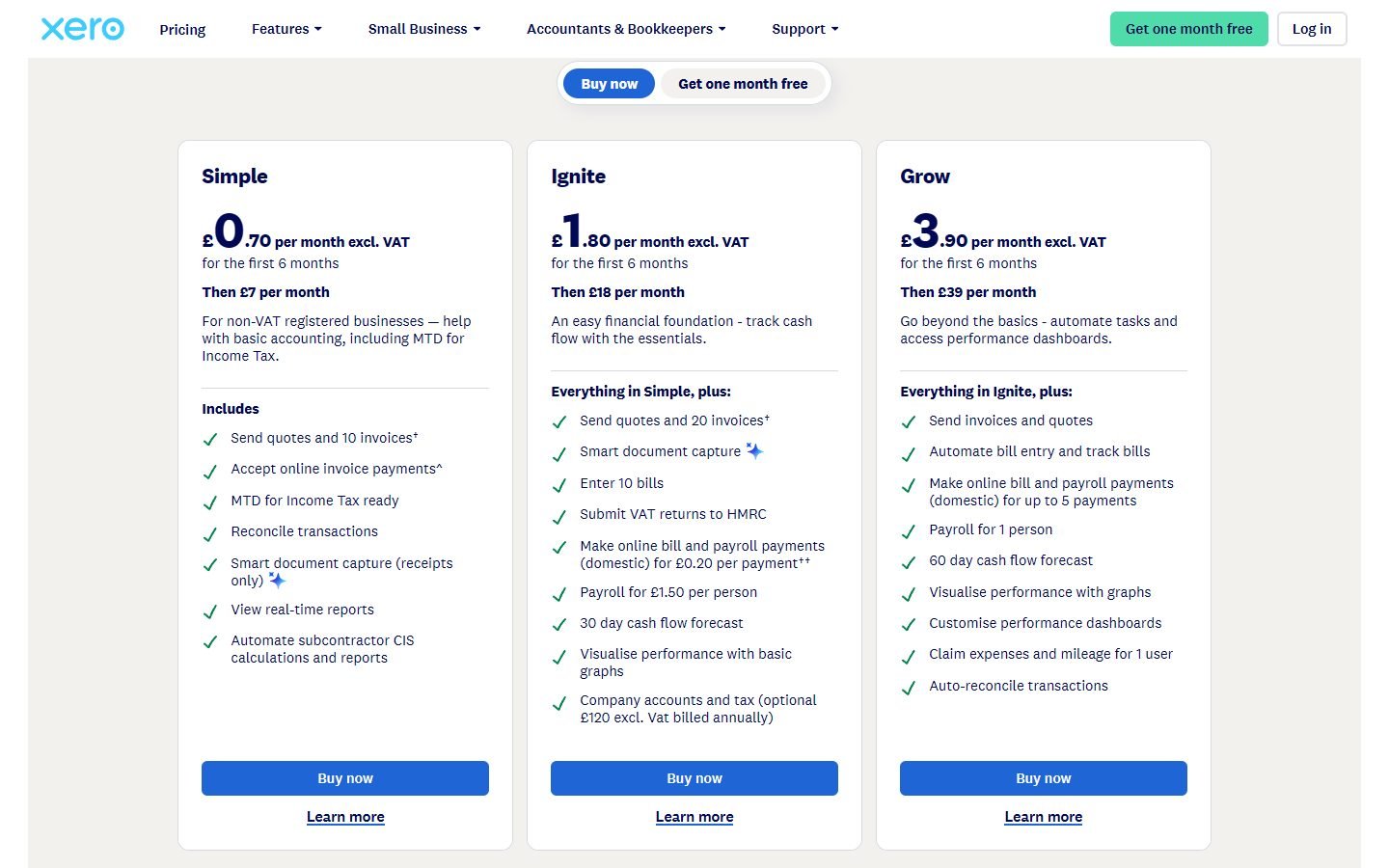
These are the UK products we’ve verified that state MTD for Income Tax support on their own pages. Regular monthly prices, excluding VAT:
| Product | Cheapest MTD for Income Tax option | Worth knowing |
|---|---|---|
| Sage Sole Trader | Free (non-VAT sole traders); £7 for Sole Trader | Free plan: 5 invoices a month, 1 bank, landlord income; £7 adds CIS and unlimited invoices |
| Zoho Books UK | Free plan lists MTD for Income Tax | Also lists MTD VAT, CIS and SA100 on Free; 1 user + accountant |
| Xero UK | Simple £7 (non-VAT) | 10 invoices; every UK plan is MTD for Income Tax ready |
| QuickBooks UK | Sole Trader Plus £10 | Includes CIS; VAT starts on Simple Start (£16) |
| FreeAgent | £19 sole trader (£10 landlord) | Free with an eligible NatWest, RBS, Ulster Bank or Mettle account |
FreshBooks UK lists MTD-compliant VAT returns, but we didn’t find MTD for Income Tax on its pricing page. Whichever product you pick, search for it on HMRC’s software finder: HMRC says everything listed there has been through its recognition process.
Which is best depends on your situation. A landlord with a simple rental fits a free plan (see accounting software for landlords), a builder needs CIS, and a VAT-registered business wants VAT and Income Tax in one place. Our UK MTD software comparison goes through each product, and there are full reviews of Sage, Xero, QuickBooks and Zoho Books.
See Xero’s UK offer (partner link, opens in a new tab) Try Zoho Books free (partner link, opens in a new tab)
Checklist before you choose
- Work out your qualifying income (self-employment plus property turnover) from your last return.
- List every income source: each business, each property type, plus savings, dividends or pensions for the final return.
- Decide between all-in-one and bridging, depending on whether you want to keep your spreadsheets.
- Check the product is on HMRC’s software finder and supports your income sources and accounting period.
- If you’re VAT-registered, choose one product that handles both VAT and Income Tax.
- Diary the deadlines: 7 August, 7 November, 7 February, 7 May, and 31 January.
FAQ
Do I need software for Making Tax Digital for Income Tax?
Yes, if MTD for Income Tax applies to you. You need compatible software to keep digital records, send quarterly updates and submit your tax return. HMRC doesn’t provide software itself.
Can I keep using spreadsheets for MTD?
Yes. GOV.UK says you can keep spreadsheets, but you’ll need software that links to them (bridging software) to send quarterly updates and submit your return. The records must be digitally linked, not copied and pasted.
When is the next MTD quarterly update due?
Quarterly updates are due by 7 August, 7 November, 7 February and 7 May. For the 2026 to 2027 tax year, the second update is due by 7 November 2026.
Is there free MTD software?
Yes. Sage Sole Trader Free is for non-VAT sole traders, Zoho Books UK’s free plan lists MTD for Income Tax, and FreeAgent is free with eligible NatWest, RBS, Ulster Bank or Mettle accounts. HMRC notes free products may have limits, such as a set number of transactions.
